
10 free ServiceNow CIS-EM practice questions with the correct answer and a full explanation for each, taken from the CertStash pack of 130 questions. Work through them, then open each answer to check your reasoning.
Get all 130 questions (US$39) · Download these 10 as a PDF
Question 1
When creating an alert management rule, where would you specify a workflow to resolve a given condition?
Show answer and explanation
Correct answer: B. From the Actions tab
The Actions tab in alert management rules is where you specify workflows and remediation actions to resolve conditions. This tab allows you to configure automated responses and workflow executions when alert criteria are met.
Why the other options are wrong
- A. The Remediation tab does not exist as a primary configuration location for workflows in alert management rules.
- C. The Launcher tab is not used for specifying workflows in alert management rule configuration.
- D. Related Links section is for linking related items, not for configuring remediation workflows.
Question 2
What types of system can a MID Server install on? (Choose two.)
Show answer and explanation
Correct answer: B, C
B. Microsoft Windows Server C. Linux System A MID Server can be installed on Microsoft Windows Server and Linux systems. These are the two supported operating systems for MID Server deployment, allowing the server to communicate between ServiceNow and monitoring sources.
Why the other options are wrong
- A. OpenVMS is not a supported operating system for MID Server installation.
- D. Microsoft Windows Desktop is not a supported platform; only Windows Server is supported.
- E. While location matters, this is not a system type that determines MID Server compatibility.
- F. Mac OS X is not a supported operating system for MID Server installation.
Question 3
What would be the primary use case for creating Javascripts in Event Management?
Show answer and explanation
Correct answer: C. To parse a nodename out of your raw event data in an event rule
Javascripts in Event Management are primarily used to parse and extract data from raw event fields, such as extracting a nodename from raw event data within event rules. This allows for data transformation and normalization of incoming events.
Why the other options are wrong
- A. Creating pull connectors requires specific connector development, not general Javascripts in Event Management.
- B. Populating the CMDB is handled through CMDB reconciliation rules, not Event Management Javascripts.
- D. Remediation workflows run through the Actions/Remediation framework, not as Javascripts in Event Management.
Question 4
What would you use to define the monitoring sources allowed to communicate with the ServiceNow instance for Operational Intelligence?
Show answer and explanation
Correct answer: C. Metric Type Actions
Metric Type Actions are used to define and configure the monitoring sources that are allowed to communicate with the ServiceNow instance for Operational Intelligence. This controls which sources can send metrics and data.
Why the other options are wrong
- A. Metric Registration is used to register metrics, not to define allowed communication sources.
- B. Metric Config Rules are for configuring metric behavior and processing, not for defining allowed sources.
- D. Metric to CI is used for mapping metrics to Configuration Items, not for source authorization.
Question 5
The value of the Alert Priority score is a composite of what?
Show answer and explanation
Correct answer: C. The value of the alert’s Severity and its Priority Group
The Alert Priority score is calculated as a composite of the alert's Severity and its Priority Group. These two values are combined to determine the overall priority ranking of an alert.
Why the other options are wrong
- A. Category is not a component of the Alert Priority score calculation.
- B. While Priority Group is involved, category is not used in the composite score.
- D. Relative weight is not the term used; Priority Group is the correct component alongside Severity.
Question 6
Which attribute is responsible for de-duplication?
Show answer and explanation
Correct answer: B. Message_key
The Message_key attribute is responsible for de-duplication of events. It serves as a unique identifier that EventManagement uses to determine if an incoming event is a duplicate of an existing alert.
Why the other options are wrong
- A. Metric_name identifies the metric type but is not used for de-duplication logic.
- C. Short_description is a display field and is not the attribute used for de-duplication.
- D. Additional_info contains supplementary data but is not the de-duplication identifier.
Question 7
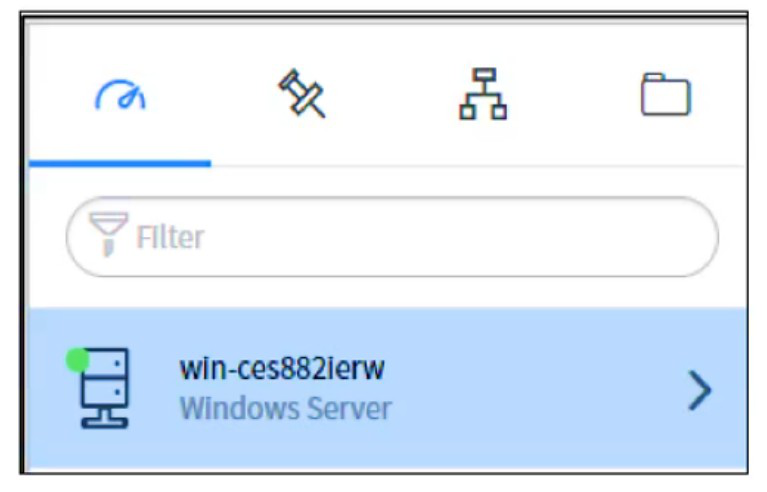
How would you interpret the following data in the Operational Intelligence Insights Explorer?
Show answer and explanation
Correct answer: B. win-ces882ierw is one of your hottest Configuration Items (CIs), but is currently experiencing a low probability of anomalies
Items (CIs), but is currently experiencing a low probability of anomalies The green indicator dot next to win-ces882ierw signals low or normal operational status, not an anomalous state. In Operational Intelligence Insights Explorer, a green status indicator means the system is functioning normally with a low probability of anomalies, even if it may be ranked as a 'hot' or frequently monitored Configuration Item. The system is operating as expected and does not require immediate intervention.
Why the other options are wrong
- A. Incorrect because the green status indicator denotes low probability of anomalies, not high probability requiring immediate attention.
- C. Incorrect because the green indicator contradicts a high probability of anomalies; additionally, being on a 'customized list' does not override the low-anomaly status shown by the green dot.
- D. Incorrect because there is no evidence that this is a 'customized list' of CIs, it appears to be a standard operational view showing monitored systems.
Question 8
What is the default collection/polling interval applied to all event connectors?
Show answer and explanation
Correct answer: A. Every 120 seconds
The default collection and polling interval applied to all event connectors is 120 seconds. This is the standard interval at which connectors check for new events from their sources.
Why the other options are wrong
- B. Five seconds is too frequent for default event collection intervals.
- C. Forty seconds is not the standard default polling interval.
- D. While sixty seconds is common, the actual default is 120 seconds.
- E. Ten seconds is not the standard default collection interval.
Question 9
Where can you look to determine what event rule created an alert? (Choose two.)
Show answer and explanation
Correct answer: A, C
A. Alert Activity C. Event Processing Notes Alert Activity and Event Processing Notes are where you can determine which event rule created an alert. Alert Activity logs the history of the alert including its creation, and Event Processing Notes capture details about which rules were applied during event processing.
Why the other options are wrong
- B. Event Additional Information contains supplementary data but does not indicate which rule created the alert.
- D. Event Message Key is used for de-duplication, not for identifying the source rule.
- E. Alert Source indicates where the alert originated from, not which rule created it.
Question 10
What feature would you use to trigger a workflow or automatically generate tasks via templates?
Show answer and explanation
Correct answer: A. Event rules
Event rules are the feature used to trigger workflows and automatically generate tasks via templates in ServiceNow Event Management. Event rules define conditions based on incoming events and specify actions such as task creation from predefined templates or workflow initiation when those conditions are met.
Why the other options are wrong
- B. Task rules are used to manage and organize existing tasks, not to automatically generate them from templates.
- C. Alert management rules configure alert behavior such as correlation and deduplication, not template-based task generation.
- D. Alert correlation rules combine related alerts into a single alert record and do not generate tasks from templates.
That was 10 of 130.
The full ServiceNow CIS-EM pack has all 130 questions, each with the answer, the explanation and why the other options are wrong, plus a questions-only copy for timed runs. US$39, paid once, with free monthly updates and a pass-or-your-money-back guarantee.