
10 free Fortinet NSE5_FSW_AD-7.6 practice questions with the correct answer and a full explanation for each, taken from the CertStash pack of 64 questions. Work through them, then open each answer to check your reasoning.
Get all 64 questions (US$39) · Download these 10 as a PDF
Question 1
Which two are valid traffic processing actions that a FortiSwitch access control list (ACL) can apply to matching traffic? (Choose two.)
Show answer and explanation
Correct answer: B, D
B. Assign traffic to a high-priority egress queue. D. Drop frames. FortiSwitch ACLs can apply traffic processing actions including dropping frames and assigning traffic to egress queues for QoS purposes. These are standard Layer 2 switch capabilities. Redirecting frames to another port and encrypting frames are not valid ACL actions on FortiSwitch devices.
Why the other options are wrong
- A. Frame redirection to another port is not a standard FortiSwitch ACL action.
- C. Encryption of frames is not performed by ACLs; encryption would be handled at higher network layers.
Question 2
Which two statements about 802.1X authentication on FortiSwitch ports are true? (Choose two.)
Show answer and explanation
Correct answer: A, B
A. In port-based 802.1x, all hosts behind an authenticated port are allowed access after a successful authentication. B. A port policy is used to apply 802.1x authentication on a FortiSwitch interface. In port-based 802.1X, once a port is authenticated, all hosts connected behind that port are allowed access without individual authentication. Port policies are used to apply 802.1X authentication on FortiSwitch interfaces. 802.1X can be applied to both access and trunk ports, and not all devices are required to support 802.1X for network operation.
Why the other options are wrong
- C. 802.1X can be applied to both access ports and trunk ports, not exclusively to trunk ports.
- D. Not all devices need to support 802.1X; only devices needing authenticated access require this capability.
Question 3
Refer to the exhibits.
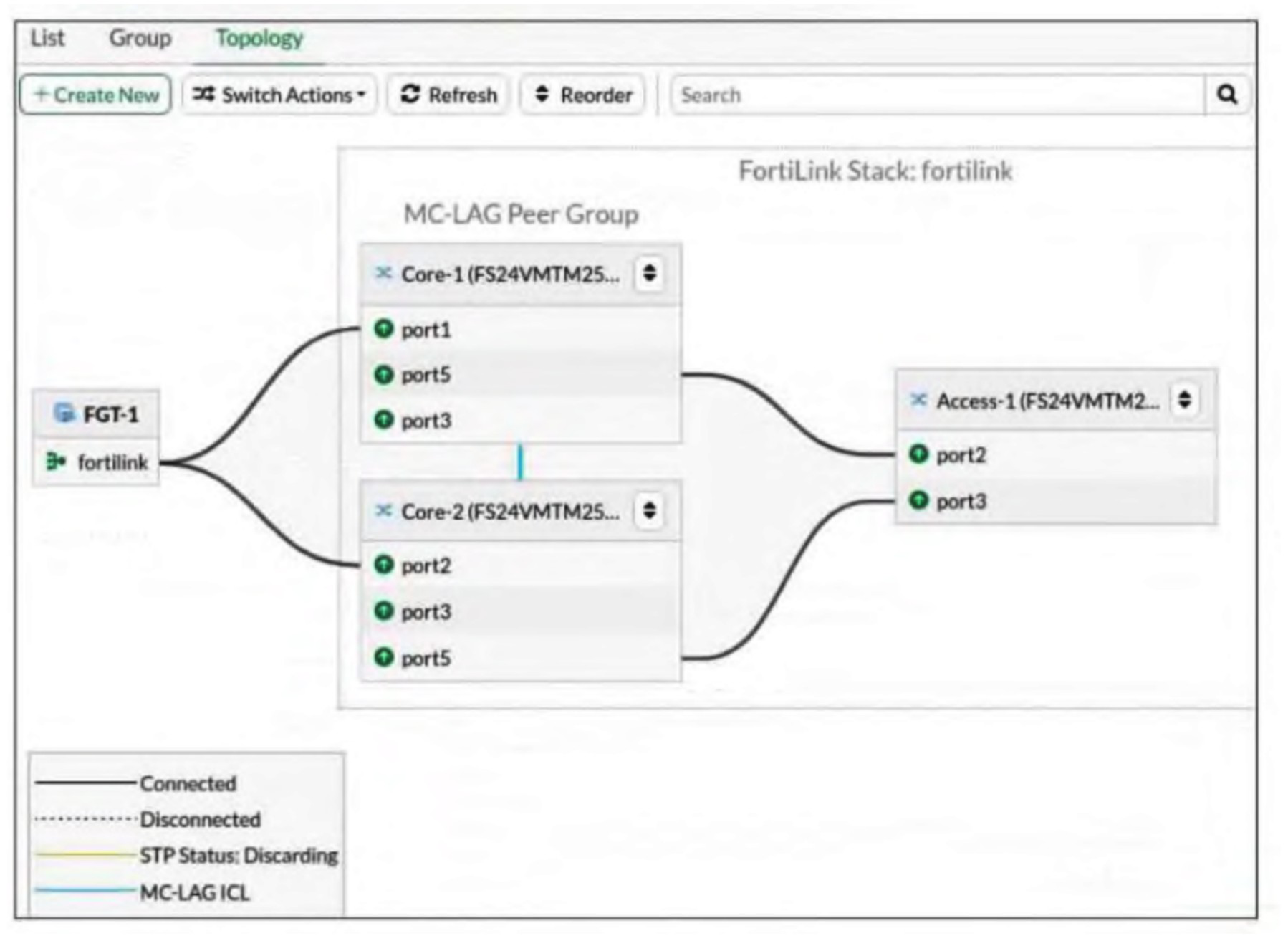
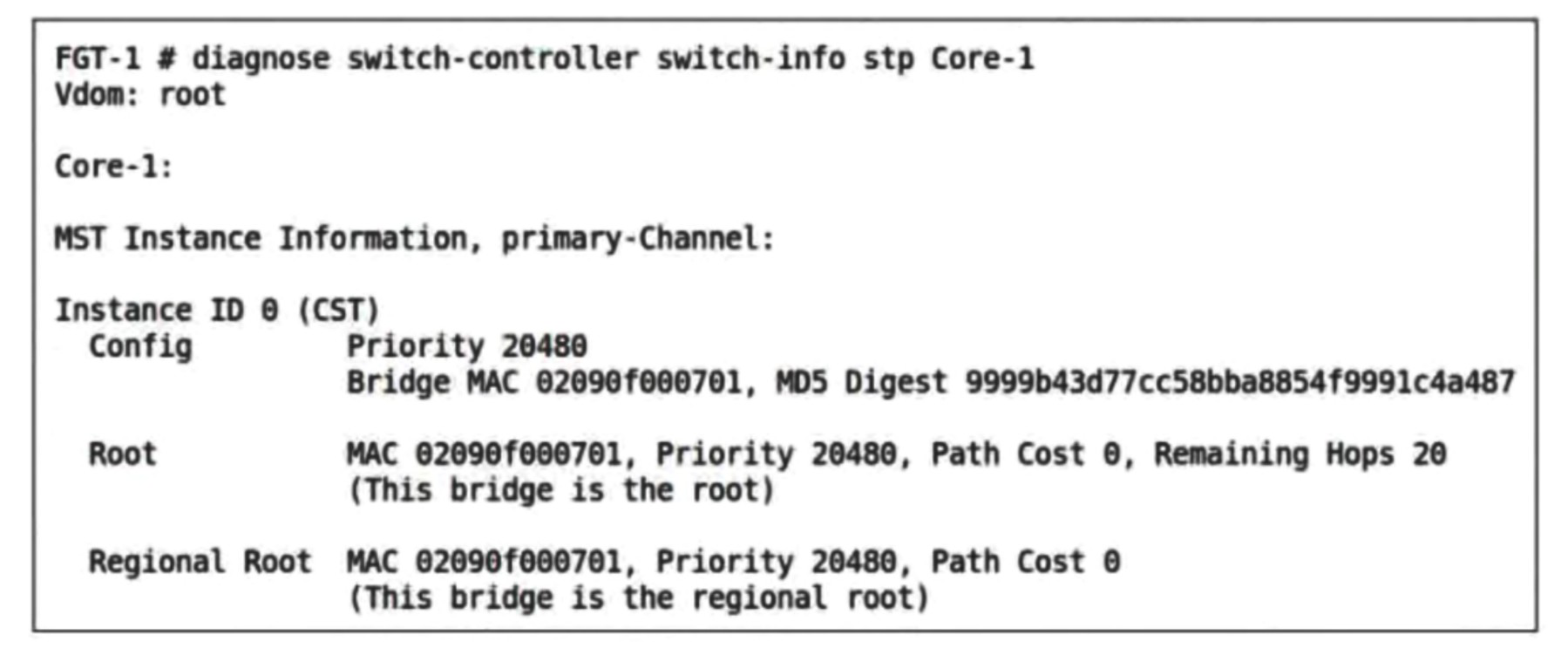
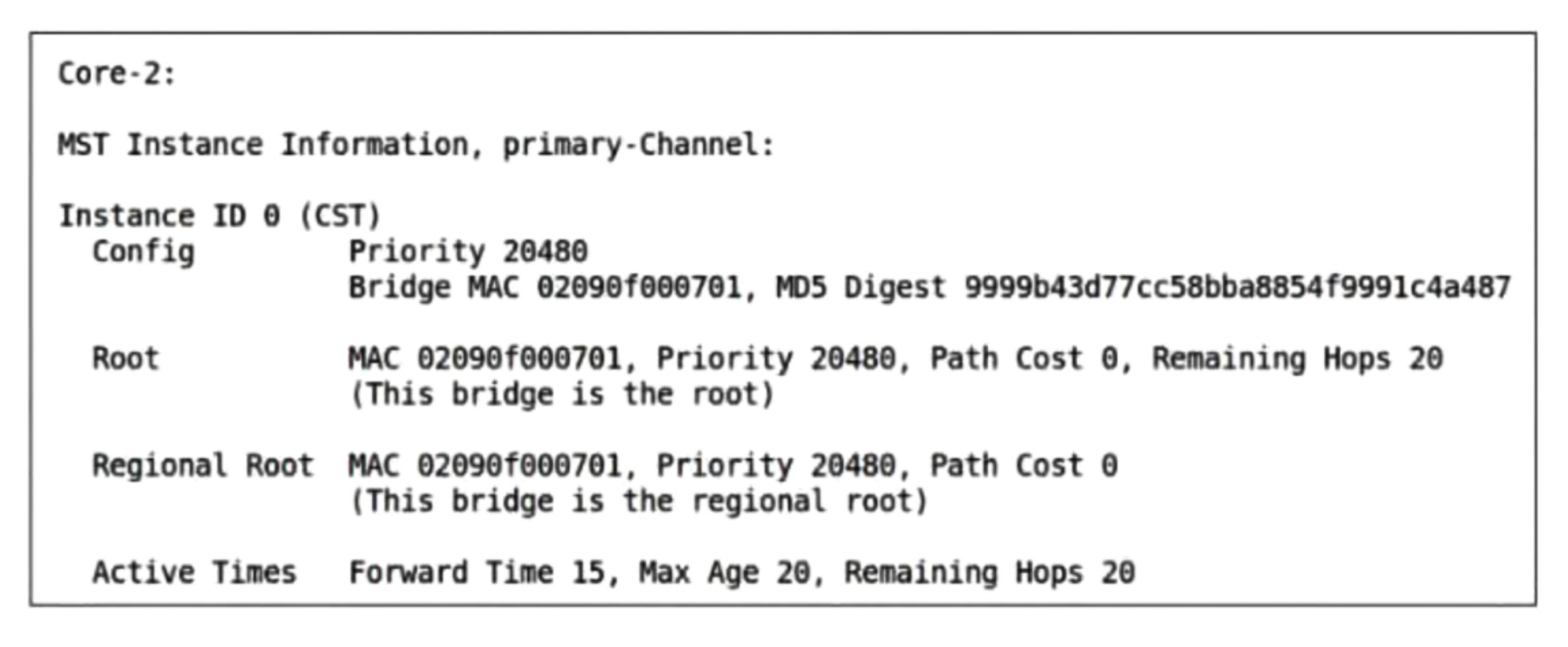
Topology view -Core-1 CLI output -Core-2 CLI output -An administrator has deployed two FortiSwitch devices, Core-1 and Core-2, as multichassis link aggregation group (MCLAG) peers. These switches are connected to FortiGate for FortiLink and to an access switch (Access-1) using an inter-switch link (ISL). After configuration, the administrator notices that both Core-1 and Core-2 are claiming to be the root bridge in the Multiple Spanning Tree Protocol (MSTP) topology.
What explains this behavior?
Show answer and explanation
Correct answer: C. Both switches share the same bridge ID because MCLAG treats them as one logical switch.
MCLAG treats them as one logical switch. In MCLAG (Multi-Chassis Link Aggregation Group), the two peer switches are logically treated as a single entity and share the same bridge MAC address and bridge ID. This is evident from the CLI output where both Core-1 and Core-2 display identical bridge MAC addresses (02090f000701) and identical priority values (20480), both claiming to be the root bridge. This shared bridge identity is the fundamental design of MCLAG, it presents a unified logical switch to the network, which includes presenting a single bridge ID in MSTP. Both switches legitimately claim the root role because they literally share the same identity, and this is correct behavior for an MCLAG deployment.
Why the other options are wrong
- A. FortiGate does not participate in MSTP; it connects via FortiLink which is separate from the spanning tree topology managed by the switches.
- B. The ISL is functioning correctly as evidenced by the MC-LAG ICL indicator in the topology diagram; MSTP inconsistency would manifest differently, not with both switches claiming root with identical bridge IDs.
- D. MCLAG does not disable STP; rather, it requires STP/MSTP to function properly for loop prevention, and both switches continue to participate in MSTP as a unified logical entity.
Question 4
Refer to the exhibit.
Network Topology
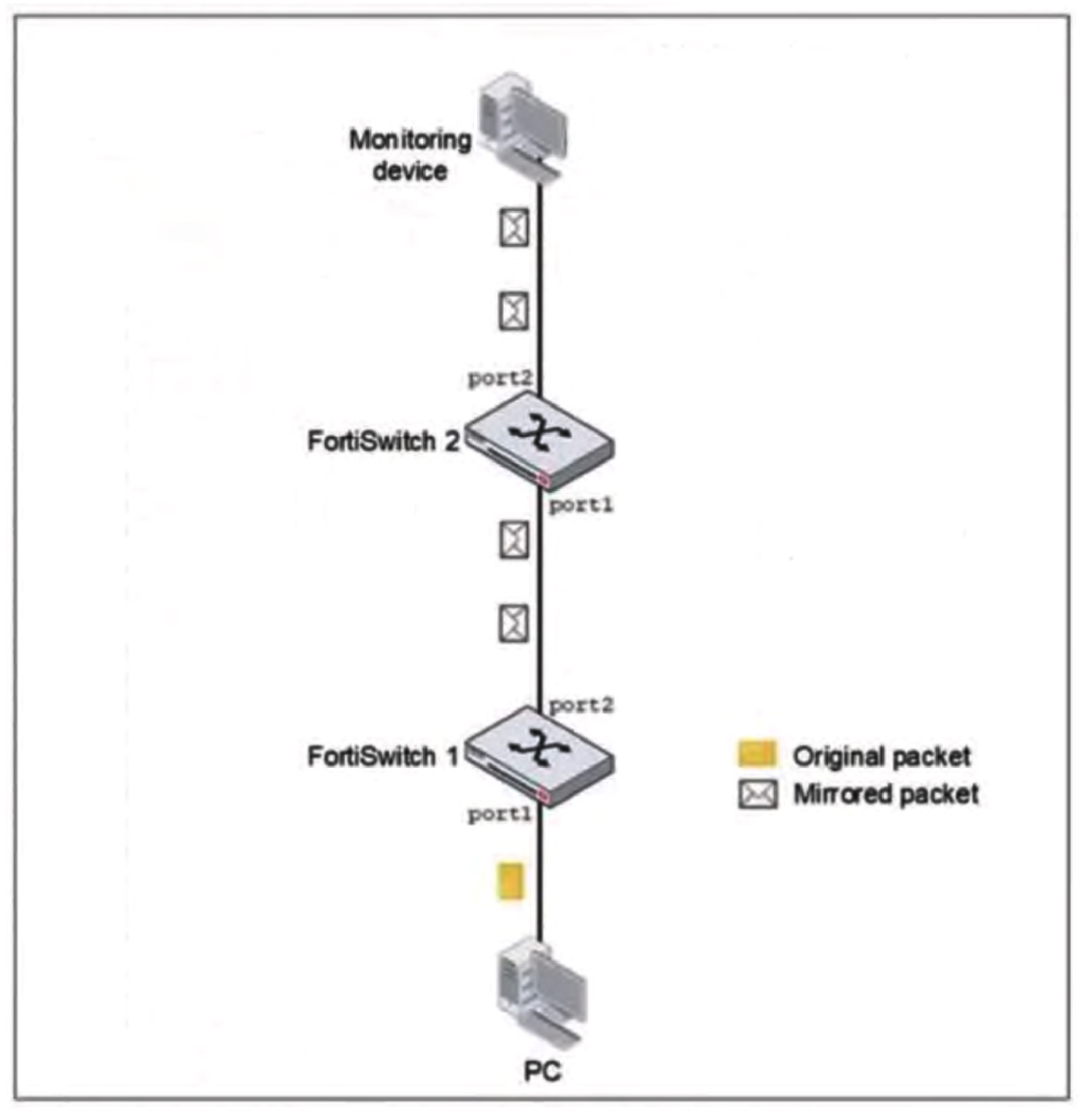
You configured Switched Port Analyzer (SPAN) to monitor traffic from a source port on FortiSwitch 1, but the monitoring device is connected to FortiSwitch 2. After port mirroring configuration on FortiSwitch 1, the monitoring device is not receiving any mirrored traffic.
What is the most likely reason the mirrored traffic is not reaching the monitoring device?
Show answer and explanation
Correct answer: A. SPAN does not support forwarding mirrored traffic across multiple switches.
SPAN (Switched Port Analyzer) is a local switching feature that mirrors traffic from a source port to a destination port on the same switch. When the monitoring device is connected to FortiSwitch 2 but the SPAN session is configured on FortiSwitch 1, the mirrored traffic cannot traverse between the two switches because SPAN does not support forwarding mirrored packets across multiple switches in a daisy-chain topology. To monitor traffic from FortiSwitch 1 at a device on FortiSwitch 2, the monitoring device would need to be connected to FortiSwitch 1 directly, or a remote SPAN (RSPAN) solution would be required if available.
Why the other options are wrong
- B. SPAN filtering with ACLs is optional and not required for basic SPAN operation; absence of ACL filtering would not prevent mirrored traffic from being sent to the destination port.
- C. Restarting a SPAN session does not address the fundamental architectural limitation that SPAN cannot mirror traffic across switch boundaries.
- D. The monitoring device's IP address subnet is irrelevant to the physical forwarding of mirrored traffic; SPAN operates at Layer 2 and does not depend on management plane IP configuration.
Question 5
What happens if FortiSwitch fails to discover either FortiEdge Cloud or a FortiGate with FortiLink?
Show answer and explanation
Correct answer: B. It remains in local management mode.
When FortiSwitch fails to discover FortiEdge Cloud or a FortiGate with FortiLink, the device remains in local management mode. This allows continued local operation while the administrator can manually establish the connection to a management device later. The switch does not switch to FortiLink mode, does not require reimaging, and does not disable auto-network as default behaviors.
Why the other options are wrong
- A. The switch does not automatically switch to FortiLink mode when discovery fails.
- C. Manual reimaging is not required for discovery failure.
- D. Auto-network is not disabled; the device remains in local management mode.
Question 6
Refer to the exhibit.
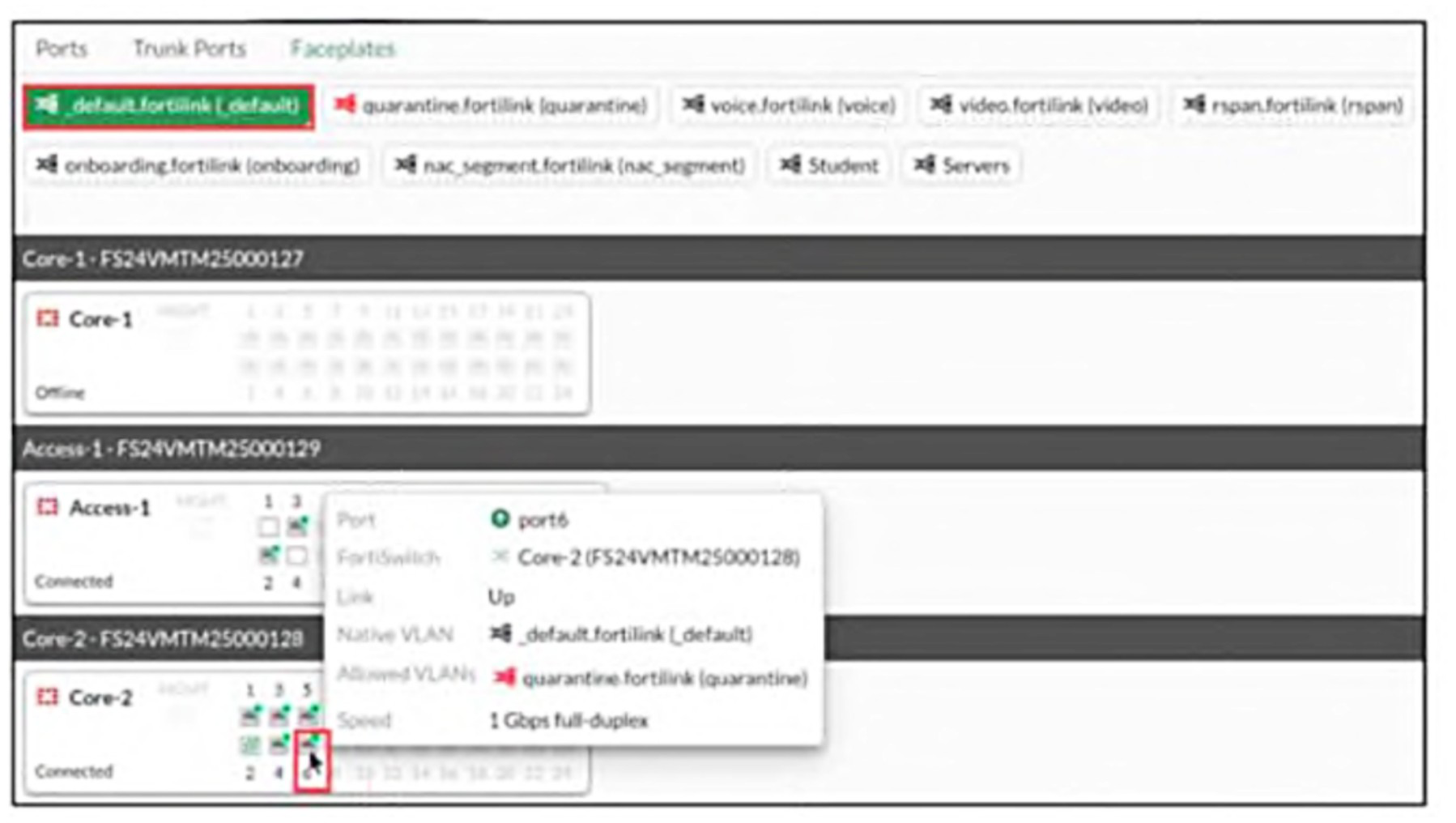
Which information does FortiGate use to generate the port details in the FortiSwitch Faceplates view?
Show answer and explanation
Correct answer: C. The LLDP advertisements received from the FortiSwitch
FortiSwitch FortiGate uses LLDP (Link Layer Discovery Protocol) advertisements received from the FortiSwitch to generate the port details displayed in the Faceplates view. LLDP is the standard discovery mechanism used in FortiLink deployments to communicate port information, VLAN details, and link status between FortiSwitch and FortiGate. The port details shown in the popup (port6, link status, native VLAN, allowed VLANs, and speed information) are all characteristics that would be advertised via LLDP frames from the FortiSwitch to the FortiGate.
Why the other options are wrong
- A. The FortiSwitch model alone does not provide dynamic port-specific details like individual port status, VLAN assignments, and link speed information.
- B. CDP (Cisco Discovery Protocol) is a Cisco proprietary protocol not used in Fortinet FortiLink environments; LLDP is the standard instead.
- D. FortiLink discovery frames are used for initial discovery and device registration, not for retrieving the detailed port information needed for the Faceplates view.
Question 7
Refer to the exhibit.
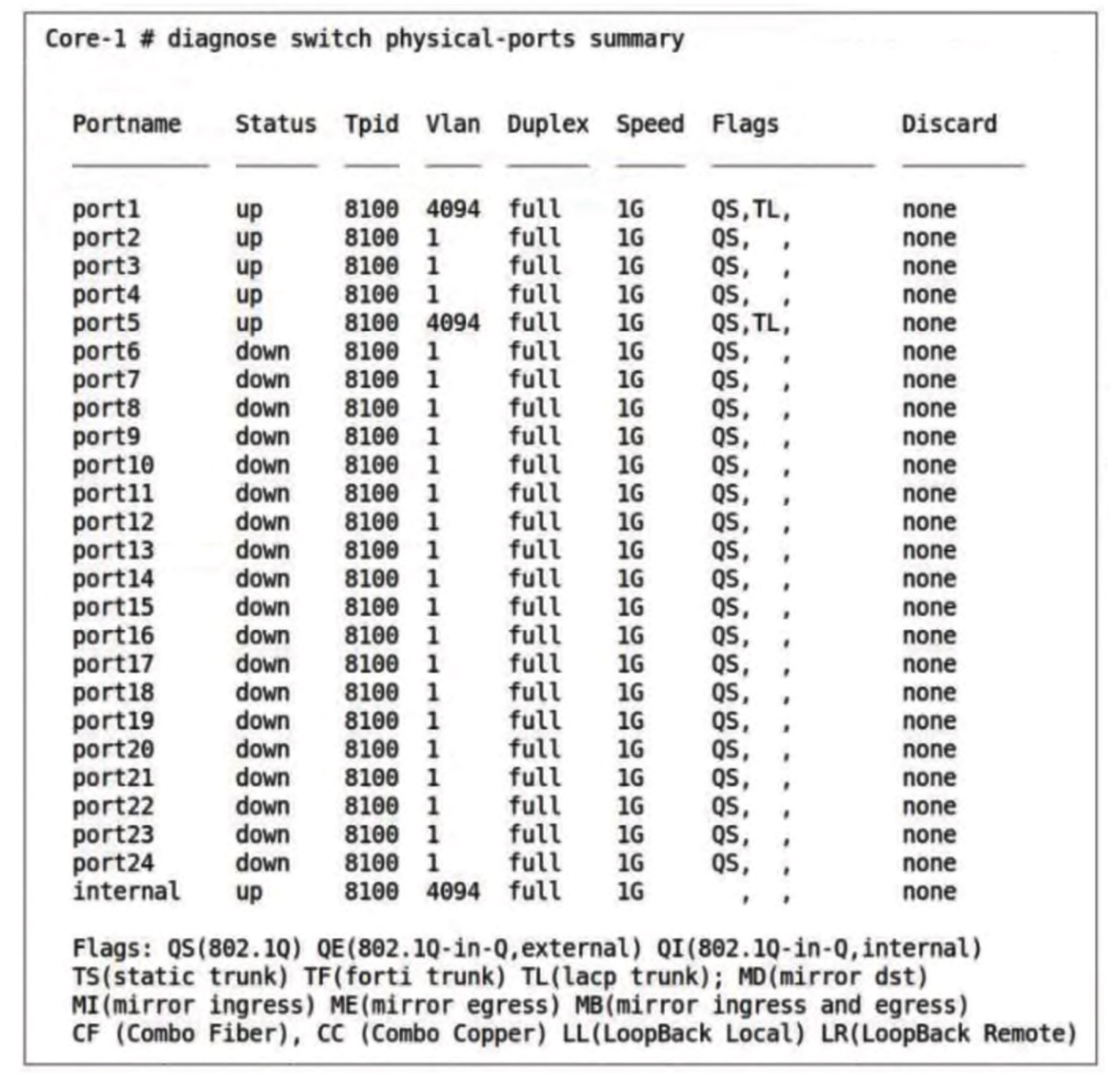
Diagnose output -The command diagnose switch physical-ports summary is executed on FortiSwitch.
Based on the VLAN assignments shown in the output, what is the most likely management configuration of this FortiSwitch?
Show answer and explanation
Correct answer: B. FortiSwitch is managed by FortiGate.
The output shows port1 and port5 assigned to VLAN 4094, which is the dedicated management VLAN used by FortiGate when managing FortiSwitch devices. When a FortiSwitch is managed by FortiGate, the management interface is placed in VLAN 4094 to separate management traffic from data traffic. The 'internal' port also shows VLAN 4094 assignment. Additionally, the presence of multiple ports in 'down' status with consistent configuration (all VLAN 1, full duplex, 1G speed) is typical of a FortiSwitch managed by FortiGate rather than operating in standalone or cloud modes. In standalone mode, the switch would typically have different VLAN assignments reflecting independent local management, while cloud-managed FortiSwitch would use different VLAN conventions.
Why the other options are wrong
- A. FortiSwitch Cloud management uses different VLAN assignments and does not rely on VLAN 4094 for management.
- C. Standalone mode would show different VLAN configurations without the dedicated management VLAN 4094 structure.
- D. Local mode is not a standard FortiSwitch management classification; the modes are standalone, cloud-managed, or FortiGate-managed.
Question 8
An administrator must deploy managed FortiSwitch devices in a remote location where multiple VLANs must be used to segment devices. No layer 3 switch or router is present at the site, and the only WAN connectivity is an ISP-provided router connected to the public internet.
Which two components are required to enable VLAN segmentation across this remote site? (Choose two.)
Show answer and explanation
Correct answer: A, E
A. FortiGate and FortiSwitch configured with VXLAN to tunnel VLANs over the WAN E. FortiGate with a layer 3 interface to terminate the VXLAN overlay To enable VLAN segmentation across a remote site without local Layer 3 infrastructure, FortiGate and FortiSwitch must be configured with VXLAN to tunnel VLANs over the WAN connection to the central site. The FortiGate with a Layer 3 interface terminates the VXLAN overlay and provides inter-VLAN routing. A dedicated Layer 3 router is not needed at the remote site, VXLAN hardware acceleration is not required, and IPsec alone does not provide VLAN tunneling.
Why the other options are wrong
- B. A local Layer 3 router is not required since the FortiGate provides inter-VLAN routing.
- C. VXLAN hardware acceleration is not a requirement for VLAN segmentation.
- D. IPsec interfaces alone do not provide the VLAN tunneling capability needed for this scenario.
Question 9
Refer to the exhibits.
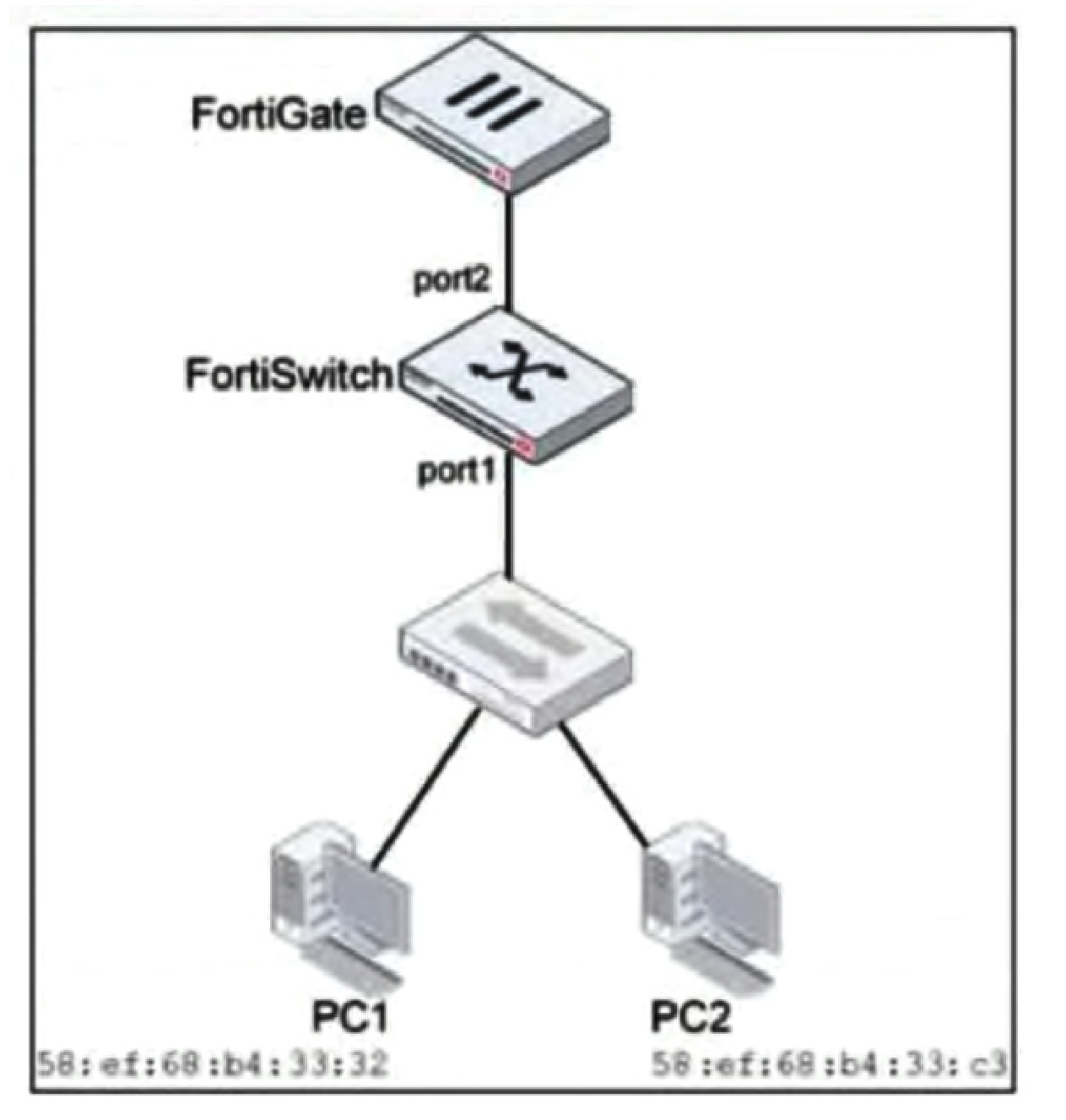
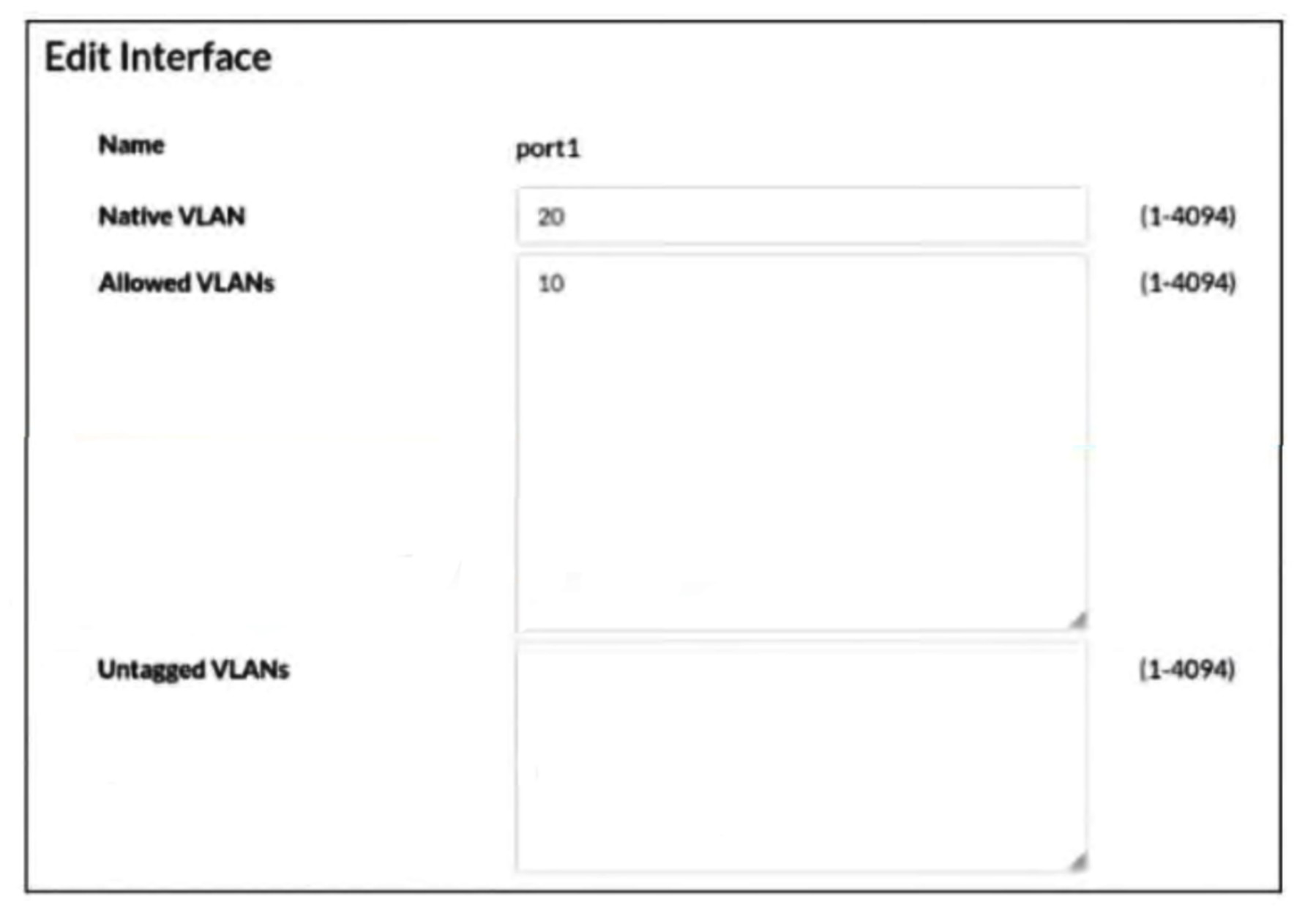
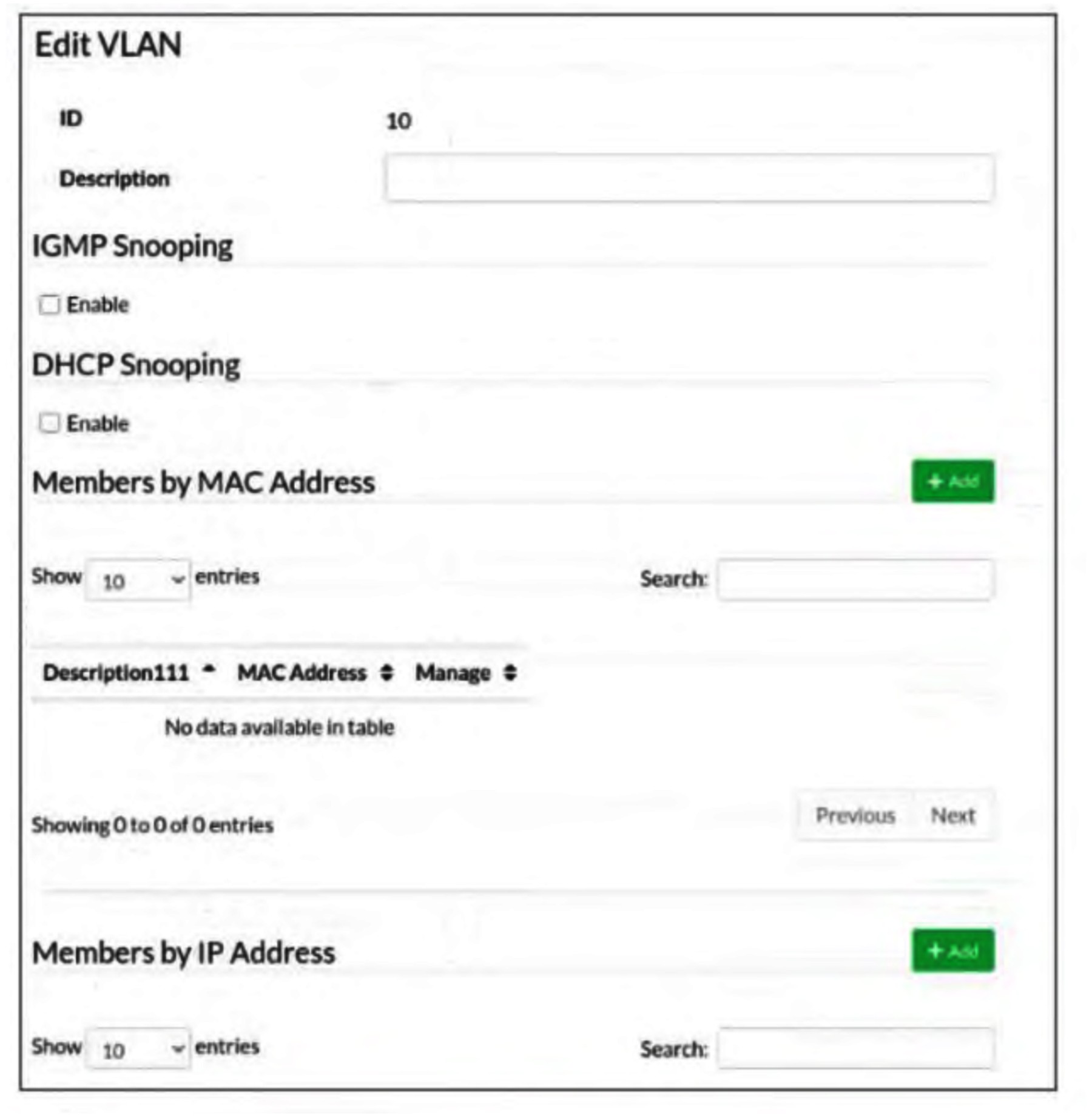
Network topology -Interface configuration -VLAN configuration -Traffic arriving on port2 on FortiSwitch is tagged with VLAN ID 10 and destined for PC1 connected on port1. PC1 expects to receive traffic untagged from port1 on FortiSwitch.
Which two configurations can you perform on FortiSwitch to ensure PC1 receives untagged traffic on port1? (Choose two.)
Show answer and explanation
Correct answer: A, D
A. Add VLAN ID 10 as a member of the untagged VLANs on port1. D. Remove VLAN 10 from the allowed VLANs and add it to untagged VLANs on port1. Traffic arriving on port2 tagged with VLAN 10 must be converted to untagged format on port1 for PC1 to receive it properly. Option A accomplishes this by explicitly adding VLAN 10 to the untagged VLANs list on port1, which strips the VLAN tag from egress traffic. Option D achieves the same result by removing VLAN 10 from allowed VLANs (which would otherwise keep it tagged) and moving it to untagged VLANs, ensuring traffic on VLAN 10 exits port1 without a tag. Both configurations ensure that frames tagged with VLAN 10 on ingress are transmitted untagged on port1.
Why the other options are wrong
- B. Including VLAN 10 and VLAN 20 as allowed VLANs keeps traffic tagged on those VLANs, which contradicts the requirement that PC1 receive untagged traffic.
- C. Adding PC1's MAC address as a member of VLAN 10 does not control whether traffic is tagged or untagged on the port; MAC-based VLAN membership is a different mechanism and does not solve the untagging requirement.
Question 10
Which QoS mechanism maps packets with specific class of service (COS) or Differentiated Services Code Point (DSCP) markings to an egress queue?
Show answer and explanation
Correct answer: B. Queuing for egress traffic
Queuing for egress traffic is the QoS mechanism that maps packets with specific CoS or DSCP markings to corresponding egress queues, enabling differentiated service levels based on traffic classification. Classification, policing, and shaping operate on different aspects of QoS but do not specifically map marked packets to egress queues.
Why the other options are wrong
- A. Classification operates on ingress traffic and identifies traffic but does not map to egress queues.
- C. Policing enforces traffic rate limits on ingress traffic, not egress queue mapping.
- D. Shaping buffers and delays egress traffic for rate control but is not the mechanism for mapping CoS/DSCP to queues.
That was 10 of 64.
The full Fortinet NSE5_FSW_AD-7.6 pack has all 64 questions, each with the answer, the explanation and why the other options are wrong, plus a questions-only copy for timed runs. US$39, paid once, with free monthly updates and a pass-or-your-money-back guarantee.