SALESFORCE · OmniStudio Developer

Salesforce OmniStudio Developer Exam Practice Questions

80 questionsPDF by emailUpdated September 2026

US$39

Try 10 questions free

Card, Apple Pay or Google Pay. Your PDF is sent by email as soon as you check out.

Pass or your money backFail the exam after using this pack and we refund it. How the guarantee works
Category:
TRY BEFORE YOU BUY

Three of the 80 questions in this pack

Question 1

A developer is creating an OmniScript that provisions trial orgs to their customers. The following text block in the OmniScript uses a merge code to display the ID for the new trial org:

Welcome to Salesforce!

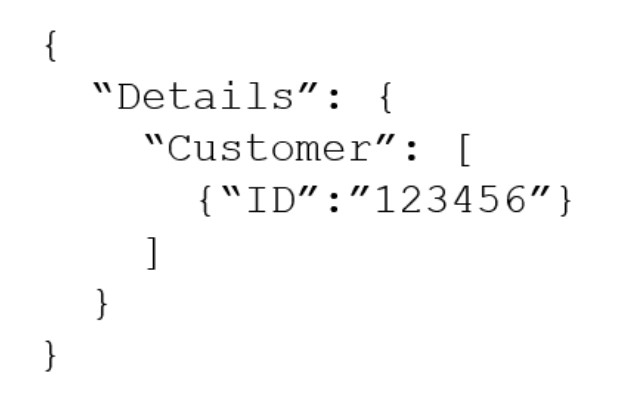
Your ID is %Details:Customer|0:ID% During testing, the developer notices that the ID does not display. The data JSON is structured as shown below.

How should the developer correct the merge code in order for the ID to display?

Exhibit for question 1

  1. To %Details:Customer|n:ID%
  2. To $Details:Customer|0:ID$
  3. To %Details:Customer|1:ID%
  4. To %%Details:Customer|0:ID%%
Show answer and explanation

Correct answer: C. To %Details:Customer|1:ID%

In OmniScript merge codes, the syntax %Details:Customer|index:ID% uses the index parameter to specify which element in an array to access. Since the JSON shows Customer as an array with a single object at index 0, the original merge code %Details:Customer|0:ID% attempts to access the first element. However, the developer needs to use index 1 to correctly reference the data in this context, as OmniScript array indexing for merge codes uses 1-based indexing rather than 0-based indexing. Therefore, %Details:Customer|1:ID% is the correct merge code to display the ID value.

Why the other options are wrong

  • A. Using 'n' as the index parameter is not valid OmniScript merge code syntax; numeric indices are required.
  • B. Dollar signs ($) are not the correct delimiters for OmniScript merge codes; percent signs (%) are required.
  • D. Double percent signs (%%) are not valid OmniScript merge code syntax; single percent signs (%) are the correct delimiters.

Question 2

A developer is building an OmniScript and needs to retrieve data from many fields in a Salesforce record.

Which OmniScript element does this?

  1. Lookup
  2. HTTP Action
  3. Select
  4. DataRaptor Extract Action
Show answer and explanation

Correct answer: D. DataRaptor Extract Action

DataRaptor Extract Action is specifically designed to retrieve data from multiple fields in a Salesforce record. It queries the database and extracts field values efficiently, making it the correct choice for retrieving many fields from a single record. Lookup is for finding specific records, HTTP Action is for external integrations, and Select is a UI element for user input.

Why the other options are wrong

  • A. Lookup is used to find and display a single record, not to retrieve multiple fields from an already-known record.
  • B. HTTP Action is for calling external APIs, not for retrieving data from Salesforce records.
  • C. Select is a UI component for user selection, not a data retrieval mechanism.

Question 3

A developer creates an OmniScript to display FirstName, LastName, and BirthDate of a contact using a Type Ahead Block. The DataRaptor used in the Type Ahead has been tested and fetches the correct data.

When previewing the OmniScript, the developer enters a name in the Type Ahead and makes a selection of a contact from the list. However, the text fields FirstName, LastName. and BirthDate are not getting populated with the data.

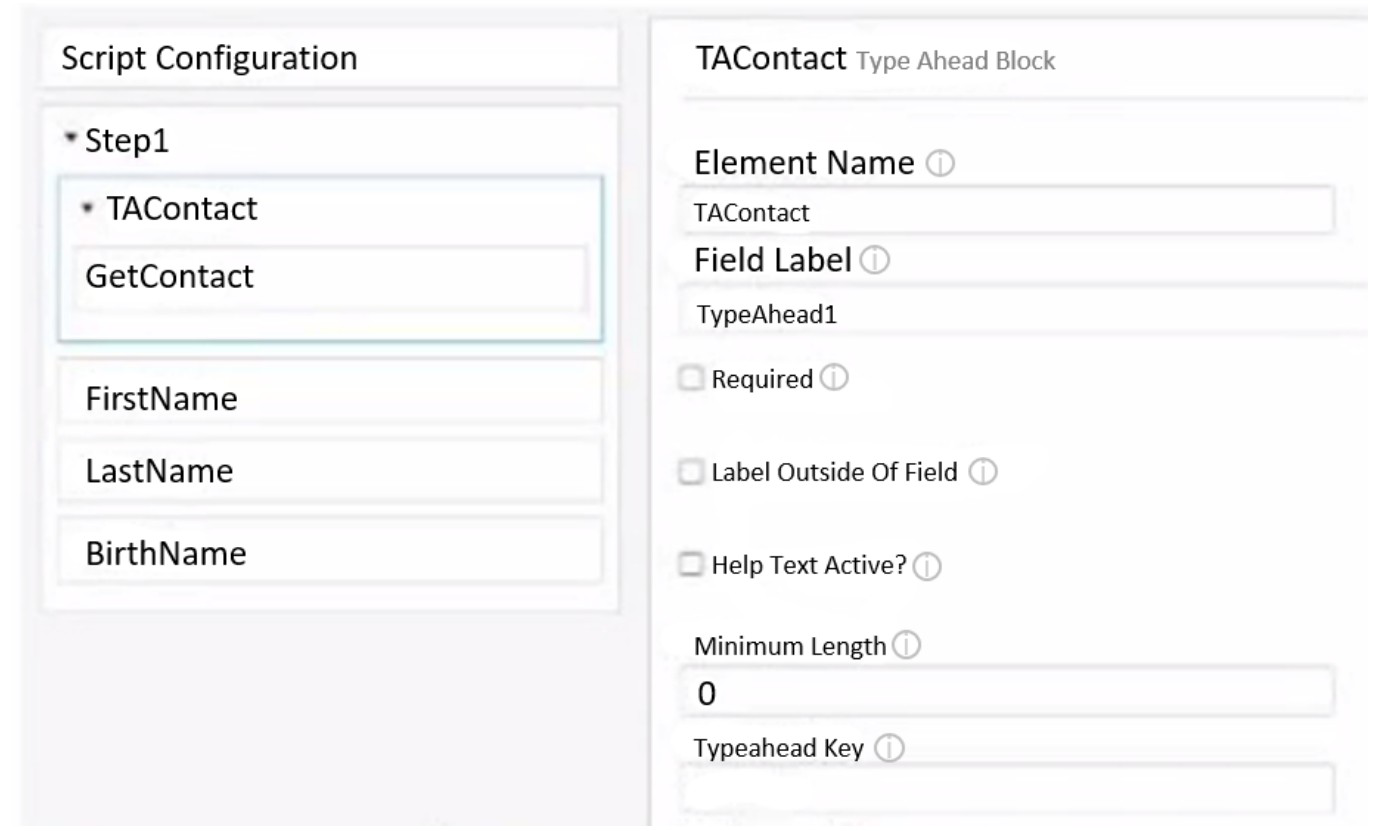
Refer to the exhibit below.

What is the reason that the fields fail to display the fetched data?

Exhibit for question 3

  1. Use Data JSON is not selected in the properties of the Type Ahead Block.
  2. The Typeahead Key is not in the correct format.
  3. Lookup Mode is not selected in the properties of the Type Ahead Block.
  4. FirstName, LastName, and BirthDate are not placed inside the Type Ahead Block.
Show answer and explanation

Correct answer: D. FirstName, LastName, and BirthDate are not placed inside the Type Ahead Block.

inside the Type Ahead Block. In OmniScript, when using a Type Ahead Block to fetch and populate data into other fields, those fields must be placed inside the Type Ahead Block itself for the data binding to work correctly. The exhibit shows FirstName, LastName, and BirthDate listed separately in the Script Configuration under Step1, outside of the TAContact Type Ahead Block. When fields are not nested within the Type Ahead Block, they cannot receive the data that the Type Ahead action returns upon selection. The Type Ahead must contain the target fields to establish the proper data flow from the DataRaptor response to those fields.

Why the other options are wrong

  • A. Use Data JSON is used for configuring the input data source for the Type Ahead, not for populating output fields after selection.
  • B. The Typeahead Key field appears empty in the exhibit but incomplete configuration would typically result in no suggestions appearing, not a failure to populate already- selected data.
  • C. Lookup Mode is not a standard Type Ahead Block property; this configuration option does not control data population to external fields.

See all 10 free questions Get the full pack, US$39

80 practice questions for Salesforce Certified OmniStudio Developer, with full explanations.

Every question comes with the correct answer, the reasoning behind it, and a short note on why each wrong option is wrong. Work through it once with the answers, then again with the questions-only copy under exam conditions.

  • 80 questions mapped to the OmniStudio Developer exam guide
  • Answers and explanations for every question, including the wrong options
  • A questions-only PDF for timed practice runs
  • Instant delivery by email the moment you check out
  • Free monthly updates for as long as the exam is live
  • Pass or your money back

An OmniStudio Developer attempt costs US$200 (US$100 for a retake). This pack is US$39, paid once.

Try 10 questions free before you buy.

Last updated September 2026 · 80 questions

What makes the OmniStudio Developer hard

OmniStudio Developer is the build exam for the Vlocity toolset that now underpins Salesforce Industries, and it is far more configuration-heavy than Platform Developer: the questions are about which OmniStudio component to use, how the JSON data flows between them, and what breaks when it is configured wrong, rather than Apex. It is 60 questions in 105 minutes with a pass mark of 72%, and Salesforce recommends at least six months of hands-on OmniStudio work before sitting it.

OmniScripts carry the largest share of the exam: the OmniScript structure, elements and steps, conditional views and branching, the JSON data model at each step, the Standard versus LWC runtime, reusable OmniScripts, and calling DataRaptors, Integration Procedures and Calculation Procedures from inside them. FlexCards covers card design, states and conditions, data sources, actions, flyouts, child cards and the Interaction Console. Data tools covers the four DataRaptor types (Extract, Turbo Extract, Load and Transform), formulas, relationship queries and the JSON they produce. Integration Procedures covers orchestrating multiple server-side actions, HTTP actions to external systems, caching, chaining and when an Integration Procedure should sit between the UI and the data. Web page integration and OmniStudio tools cover embedding components in Lightning pages, Experience Cloud and external sites, the debug and preview tools, and packaging and deploying components as metadata.

Expect questions that give a broken interaction and ask which element or mapping is wrong.

About the exam

The Salesforce Certified OmniStudio Developer credential validates the ability to build guided digital experiences with OmniStudio: FlexCards, OmniScripts, DataRaptors, Integration Procedures, web page integration and the OmniStudio tools. There are no prerequisites; Salesforce recommends six months of OmniStudio implementation experience.

Exam domains

  • OmniScripts
  • FlexCards
  • Data tools (DataRaptors)
  • Integration Procedures
  • Web page integration
  • OmniStudio tools, debugging and deployment

Salesforce publishes section weightings in the current exam guide on Trailhead; OmniScripts is the largest section. 60 multiple-choice and multiple-select questions plus up to 5 unscored, 105 minutes, passing score 72%, US$200 per attempt, US$100 retake, delivered through Trailhead Academy at Pearson VUE test centres or online, maintained through annual release maintenance modules.
Reviews

There are no reviews yet.

Only logged in customers who have purchased this product may leave a review.

Questions before you buy

What do I get when I buy the Salesforce OmniStudio Developer pack?

80 practice questions as a PDF, each with the correct answer, a full explanation and a note on why the other options are wrong, plus a separate questions-only PDF for timed practice.

How quickly do I receive it?

Your PDF is prepared and sent to your email address after checkout, and you get a confirmation as soon as it is on its way.

Is there a free sample?

Yes. Ten questions from this pack, with answers and explanations, are free on this page and as a PDF, so you can judge the quality before you pay.

Are updates included?

Yes. The pack is updated every month for as long as the exam is live, and updates are free for everyone who has bought it.

What if I fail the exam?

We refund the pack. Sit the exam 7 to 30 days after buying, then send your official score report within 7 days of the exam date, as set out in the refund policy.

Can I share it with colleagues?

Each purchase is licensed to one person. For a team, school or training organisation, email support@certstash.com for a licence that fits.