
10 free Salesforce Platform Developer II practice questions with the correct answer and a full explanation for each, taken from the CertStash pack of 424 questions. Work through them, then open each answer to check your reasoning.
Get all 424 questions (US$39) · Download these 10 as a PDF
Question 1
A Visualforce page loads slowly due to the large amount of data it displays.
Which strategy can a developer use to improve the performance?
Show answer and explanation
Correct answer: C. Use lazy loading to load the data on demand, instead of the controller's constructor.
Lazy loading defers data retrieval until it is actually needed, reducing the initial page load time and controller overhead. By loading data on demand rather than in the constructor, the page renders faster and only fetches the necessary information when the user requests it. This is the most effective strategy for handling large datasets in Visualforce.
Why the other options are wrong
- A. Moving data processing to the browser with JavaScript does not reduce server load or improve initial page rendering time.
- B. The transient keyword prevents variables from being stored in ViewState, but it does not reduce the amount of data being queried or processed by the controller.
- D. actionPoller loads data asynchronously but still loads all data at once rather than on demand, and it does not improve the initial page load.
Question 2
Universal Containers wants to use a Customer Community with Customer Community Plus licenses so their customers can track how many containers they are renting and when they are due back. Many of their customers are global companies with complex Account hierarchies, representing various departments within the same organization. One of the requirements is that certain community users within the same Account hierarchy be able to see several departments' containers, based on a junction object that relates the Contact to the various Account records that represent the departments.
Which solution solves these requirements?
Show answer and explanation
Correct answer: D. An Apex Trigger that creates Apex Managed Sharing records based on the junction object's relationships
An Apex Managed Sharing trigger is the correct solution because it allows granular, dynamic sharing based on the junction object relationships. When a contact is related to multiple department accounts through the junction object, the trigger can automatically create sharing records that grant the community user access to those specific accounts. This provides the complex, hierarchy-aware access control required without relying on ownership or static views.
Why the other options are wrong
- A. A Visualforce page with a custom controller using without sharing can expose records, but it does not automatically manage the sharing relationships based on the junction object and does not scale to the dynamic nature of account hierarchies.
- B. A custom list view filters records based on static criteria and owner, but it cannot dynamically grant access based on junction object relationships or provide the granular control needed for complex account hierarchies.
- C. A custom report type and Lightning component displays data but does not actually grant sharing access to community users for the underlying records they need to view.
Question 3
Universal Containers wants to use an external Web Service provided by a third-party vendor to validate that shipping and billing addresses are correct. The current vendor uses basic password authentication, but Universal Containers might switch to a different vendor who uses OAuth.
What would allow Universal Containers to switch vendors without updating the code to handle authentication?
Show answer and explanation
Correct answer: D. Named Credential
Named Credentials encapsulate authentication details and endpoint information in a single, reusable configuration that can be referenced in Apex code without hardcoding authentication logic. By abstracting authentication away from the code, a Named Credential allows the authentication method and endpoint to be changed in setup without modifying Apex, enabling a switch from basic password authentication to OAuth or to a different vendor entirely.
Why the other options are wrong
- A. Custom Metadata can store configuration values but does not provide built-in authentication handling or the ability to dynamically manage different authentication protocols.
- B. Custom Settings store data values but do not provide authentication protocol handling or the abstraction layer needed to switch authentication methods transparently.
- C. A dynamic endpoint as a concept does not exist as a Salesforce feature; the term does not represent a mechanism for managing authentication or vendor switching.
Question 4
A company has a Lightning Page with many Lightning Components, some that cache reference data. It is reported that the page does not always show the most current reference data.
What can a developer use to analyze and diagnose the problem in the Lightning Page?
Show answer and explanation
Correct answer: D. Salesforce Lightning Inspector Storage Tab
The Storage Tab in the Lightning Inspector displays cached data, local storage, and session storage used by components. Since the issue involves cached reference data not being current, the Storage Tab allows a developer to inspect what data is stored, when it was cached, and whether stale data is being served to the user, making it the ideal tool for diagnosing caching problems.
Why the other options are wrong
- A. The Actions Tab shows component actions and attribute changes but does not directly reveal cache contents or staleness.
- B. The Event Log Tab displays component events and lifecycle but does not show what data is stored or whether it is outdated.
- C. The Transactions Tab shows network activity and performance metrics but does not directly expose cached data or identify stale cache entries.
Question 5
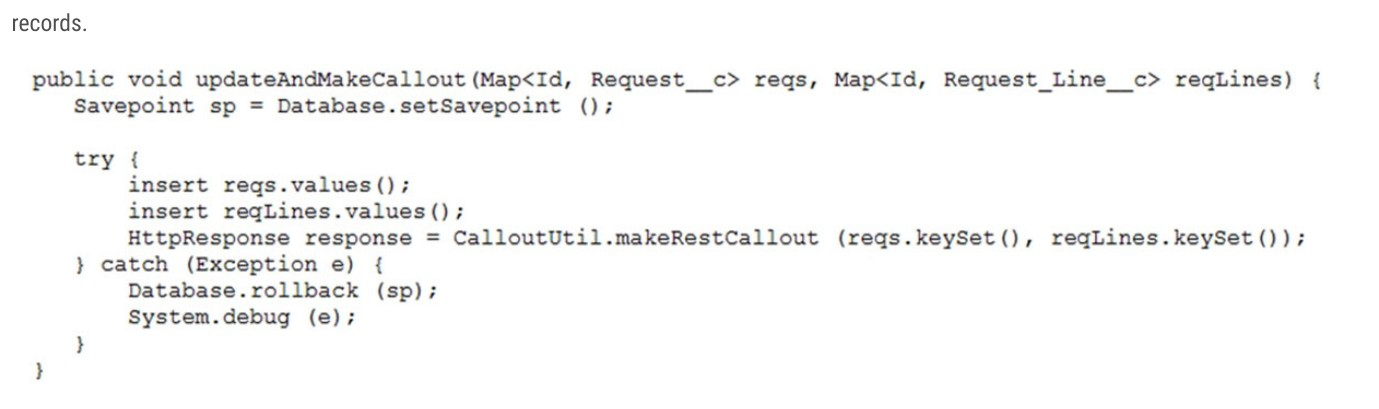
A company has code to update a Request and Request Lines and make a callout to their external ERP system's REST endpoint with the updated records.
The CalloutUtil.makeRestCallout fails with a 'You have uncommitted work pending. Please commit or rollback before calling out' error.
What should be done to address the problem?
Show answer and explanation
Correct answer: C. Change the CalloutUtil.makeRestCallout to an @future method.
@future method. In Salesforce, you cannot make HTTP callouts in the same transaction as DML operations (insert, update, delete) or database savepoint operations. The error occurs because the code attempts to insert records and then immediately make a REST callout within the same transaction. By wrapping the CalloutUtil.makeRestCallout method with @future, it executes asynchronously in a separate transaction after the current DML operations complete, eliminating the conflict between uncommitted work and the callout requirement.
Why the other options are wrong
- A. Removing the savepoint and rollback would not resolve the fundamental issue that DML and callouts cannot occur in the same transaction.
- B. @InvocableMethod is for Salesforce Flow integration and does not solve the transaction conflict; callouts still cannot be mixed with DML in the same transaction context.
- D. Moving the callout below the catch block keeps it in the same transaction as the insert statements, so the error would persist.
Question 6
A Visualforce page contains an industry select list and displays a table of Accounts that have a matching value in their Industry field.
<apex:selectList value="{!selectedIndustry}"> <apex:selectOptions values="{! industries}"/> </apex:selectList>
When a user changes the value in the industry select list, the table of Accounts should be automatically updated to show the Accounts associated with the selected industry.
What is the optimal way to implement this?
Show answer and explanation
Correct answer: C. Add an <apex:actionSupport> within the <apex:selectList>.
<apex:selectList>. The apex:actionSupport component placed within the apex:selectList will trigger a controller action when the selection changes. This is the optimal and standard way to respond to changes in a select list and update dependent components like the account table. actionFunction is used for explicitly calling actions, not for handling user interactions on form elements.
Why the other options are wrong
- A. actionFunction is not designed to be used within selectOptions; it is used to define callable actions from JavaScript.
- B. While actionFunction within selectList might work in some cases, it is not the optimal or standard approach; actionSupport is the correct component for handling select list changes.
- D. actionSupport cannot be placed within selectOptions; it must be placed within the form element that triggers the action.
Question 7
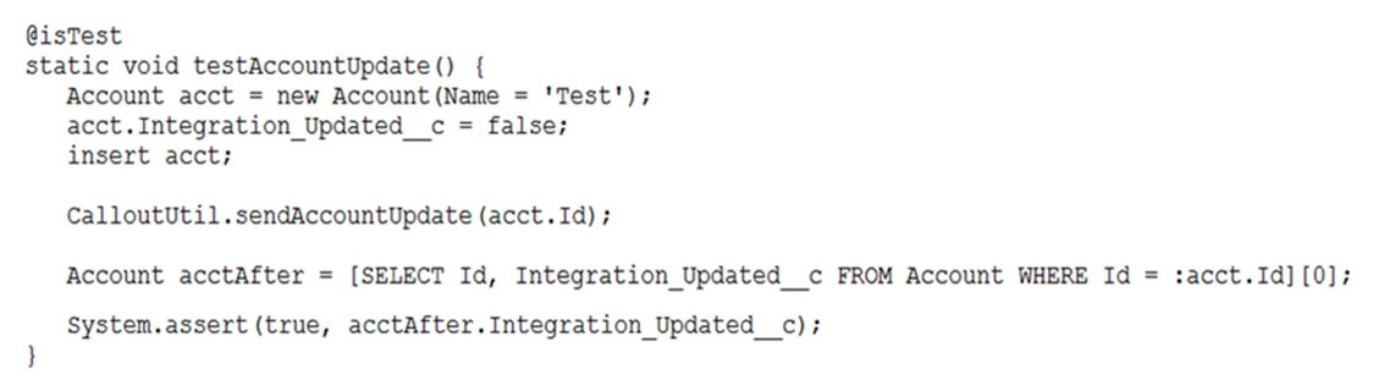
The test method above calls a web service that updates an external system with Account information and sets the Account's Integration_Updated__c checkbox to True when it completes. The test fails to execute and exits with an error: "Methods defined as TestMethod do not support Web service callouts. "
What is the optimal way to fix this?
Show answer and explanation
Correct answer: B. Add Test.startTest() and Test.setMock before and Test.stopTest() after CalloutUtil.sendAccountUpdate.
Test.stopTest() after CalloutUtil.sendAccountUpdate. In Salesforce test methods, web service callouts are not allowed by default. To enable callouts in tests, you must use Test.startTest() and Test.stopTest() to create a test context that allows them. Additionally, Test.setMock() must be called within this test context to mock the HTTP callout and prevent actual external calls. Option B correctly places Test.setMock before the callout (after Test.startTest() but before Test.stopTest()), which is the required pattern. Option A has incorrect syntax with misplaced Test.setMock placement. Option C merely skips the callout during tests rather than properly mocking it. Option D omits the essential Test.setMock() call needed to actually mock the web service.
Why the other options are wrong
- A. Test.setMock placement after Test.stopTest() is syntactically incorrect; it must be called within the test context before the callout.
- C. Conditionally skipping the callout defeats the purpose of testing the integration logic; proper mocking with Test.setMock is required.
- D. Without Test.setMock(), the test will still fail because there is no mock response defined for the web service callout.
Question 8
A developer created and tested a Visualforce page in their developer sandbox, but now receives reports that users are encountering ViewState errors when using it in Production.
What should the developer ensure to correct these errors?
Show answer and explanation
Correct answer: B. Ensure properties are marked as Transient.
ViewState errors occur when the serialized state of page components and controller properties exceeds size limits. Marking properties as transient prevents them from being serialized into ViewState, reducing its size. Since the page works in a developer sandbox (typically with less data) but fails in production (with more data), the transient keyword is the key fix to prevent ViewState overflow in the production environment with larger datasets.
Why the other options are wrong
- A. Governor limits apply to code execution within a single transaction; exceeding them produces governor limit errors, not ViewState errors.
- C. Making properties private does not prevent them from being added to ViewState; accessibility level does not control serialization.
- D. Profile access controls whether a user can view the page; it does not affect ViewState size or cause ViewState errors.
Question 9
<lightning:layout multipleRows="true"> <lightning:layoutItem size="12">{! v.account.Name} </lightning:layoutItem> <lightning:layoutItem size="12">{! v.account.AccountNumber} </lightning:layoutItem> <lightning:layoutItem size="12">{! v.account.Industry} </lightning:layoutItem> </lightning:layout> Refer to the component code above.
The information displays as expected (in three rows) on a mobile device. However, the information is not displaying as desired (in a single row) on a desktop or tablet.
Which option has the correct component changes to display correctly on desktops and tablets?
Show answer and explanation
Correct answer: C. <lightning:layout multipleRows="true"> <lightning:layoutItem size="12" mediumDeviceSize="4">{!v.account.Name} </lightning:layoutItem> <lightning:layoutItem size="12" mediumDeviceSize="4">{!v.account.AccountNumber} </lightning:layoutItem> <lightning:layoutItem size="12" mediumDeviceSize="4">{! v.account.Industry} </lightning:layoutItem> </lightning:layout>
<lightning:layoutItem size="12" mediumDeviceSize="4">{!v.account.Name} </lightning:layoutItem> <lightning:layoutItem size="12" mediumDeviceSize="4">{!v.account.AccountNumber} </lightning:layoutItem> <lightning:layoutItem size="12" mediumDeviceSize="4">{!v.account.Industry} </lightning:layoutItem> </lightning:layout> The lightning:layoutItem component supports mediumDeviceSize (tablets) and largeDeviceSize (desktops) attributes to control responsive layout. To display three items in a single row on medium and large devices, each item needs size="4" (totaling 12). The mediumDeviceSize="4" attribute ensures tablets display all three items in one row, while the original size="12" keeps mobile devices showing three rows.
Why the other options are wrong
- A. While mediumDeviceSize="6" would display two items per row on tablets, it would display two items in a row on desktops as well (since largeDeviceSize="4" gives each 4 columns, totaling 12 per row), not the intended single row of three.
- B. This option only defines largeDeviceSize but not mediumDeviceSize, leaving tablets to still display multiple rows instead of a single row as required.
- D. With mediumDeviceSize="6", tablets would display two items per row and desktops would display two items per row (since largeDeviceSize is not specified), not the desired single row of three.
Question 10
A company's support process dictates that any time a Case is closed with a Status of 'Could not fix', an Engineering Review custom object record should be created and populated with information from the Case, the Contact, and any of the Products associated with the Case.
What is the correct way to automate this using an Apex trigger?
Show answer and explanation
Correct answer: A. An after update trigger that creates the Engineering Review record and inserts it
Review record and inserts it An after update trigger is correct because it executes after the Case status is actually updated in the database, ensuring the Case record is finalized and all related data (Contact, Products) can be reliably queried. Creating and inserting the Engineering Review record in an after trigger context is safe and follows best practices, as the primary record change is already committed. A before trigger would create the record before the update is finalized, and upsert contexts are unnecessary for this one-directional requirement.
Why the other options are wrong
- B. A before update trigger executes before the Case is updated, making it risky to insert related records that depend on the Case state being finalized.
- C. Upsert includes insert logic that is unnecessary here; the requirement only calls for creating new Engineering Review records, not upserting existing ones.
- D. A before upsert trigger combines the problems of before triggers (timing) with unnecessary upsert logic and executes before the Case change is committed.
That was 10 of 424.
The full Salesforce Platform Developer II pack has all 424 questions, each with the answer, the explanation and why the other options are wrong, plus a questions-only copy for timed runs. US$39, paid once, with free monthly updates and a pass-or-your-money-back guarantee.