
10 free Google Professional Data Engineer practice questions with the correct answer and a full explanation for each, taken from the CertStash pack of 349 questions. Work through them, then open each answer to check your reasoning.
Get all 349 questions (US$39) · Download these 10 as a PDF
Question 1
Your company built a TensorFlow neutral-network model with a large number of neurons and layers. The model fits well for the training data.
However, when tested against new data, it performs poorly.
What method can you employ to address this?
Show answer and explanation
Correct answer: C. Dropout Methods
Dropout is a regularization technique that randomly deactivates neurons during training, preventing the model from relying too heavily on specific pathways and reducing overfitting. The model fits training data well but performs poorly on new data, which is the classic sign of overfitting. Dropout addresses this by forcing the network to learn more robust features that generalize better to unseen data.
Why the other options are wrong
- A. Threading is a concurrency mechanism unrelated to model generalization or overfitting issues.
- B. Serialization is about model storage and persistence, not addressing poor performance on new data.
- D. Dimensionality reduction may help with high-dimensional data but doesn't directly address overfitting in a neural network with excessive neurons and layers.
Question 2
You are building a model to make clothing recommendations. You know a user's fashion preference is likely to change over time, so you build a data pipeline to stream new data back to the model as it becomes available.
How should you use this data to train the model?
Show answer and explanation
Correct answer: B. Continuously retrain the model on a combination of existing data and the new data.
existing data and the new data. When retraining a model with streaming data, you should use a combination of existing and new data to preserve learned patterns while adapting to changing user preferences. Training only on new data (option A) causes catastrophic forgetting where the model loses previously learned fashion preferences. Using new data as a test set or training only on new data would result in a model that doesn't retain historical knowledge about user behavior.
Why the other options are wrong
- A. Training only on new data causes catastrophic forgetting and loss of previously learned patterns.
- C. New data should be used for training, not testing, to capture evolving user preferences.
- D. Training only on new data while testing on old data produces a model that cannot generalize to historical patterns.
Question 3
You designed a database for patient records as a pilot project to cover a few hundred patients in three clinics. Your design used a single database table to represent all patients and their visits, and you used self-joins to generate reports. The server resource utilization was at 50%. Since then, the scope of the project has expanded. The database must now store 100 times more patient records. You can no longer run the reports, because they either take too long or they encounter errors with insufficient compute resources.
How should you adjust the database design?
Show answer and explanation
Correct answer: C. Normalize the master patient-record table into the patient table and the visits table, and create other necessary tables to avoid self-join.
patient table and the visits table, and create other necessary tables to avoid self- join. The single wide table forces expensive self-joins and stores repeated patient attributes on every visit row, so cost grows sharply as record volume multiplies by 100. Normalizing into a patient table and a visits table, plus supporting lookup tables, removes the duplicated data and replaces self-joins with ordinary indexed joins between much smaller tables. That fixes the root cause of the failures rather than masking it with more hardware or narrower queries.
Why the other options are wrong
- A. Scaling the server 200 times is costly and leaves the redundant schema and self- joins in place, so queries remain inefficient.
- B. Sharding by date range adds operational overhead, restricts reporting to prespecified windows, and still requires the same self-joins within each shard.
- D. Splitting by clinic keeps the denormalized structure and its self-joins while forcing unions for any cross-clinic report.
Question 4
You create an important report for your large team in Google Data Studio 360. The report uses Google BigQuery as its data source. You notice that visualizations are not showing data that is less than 1 hour old.
What should you do?
Show answer and explanation
Correct answer: A. Disable caching by editing the report settings.
Google Data Studio caches data by default to improve performance. When reports must show recent data including entries less than 1 hour old, you need to disable caching in the Data Studio report settings. This ensures the report queries BigQuery for the most current data available rather than serving cached results.
Why the other options are wrong
- B. BigQuery table caching settings don't control Data Studio's report-level cache behavior.
- C. Refreshing the browser tab won't clear Data Studio's server-side cache of report data.
- D. Clearing browser history doesn't affect server-side caching of the report in Data Studio.
Question 5
An external customer provides you with a daily dump of data from their database. The data flows into Google Cloud Storage GCS as comma-separated values (CSV) files. You
want to analyze this data in Google BigQuery, but the data could have rows that are formatted incorrectly or corrupted.
How should you build this pipeline?
Show answer and explanation
Correct answer: D. Run a Google Cloud Dataflow batch pipeline to import the data into BigQuery, and push errors to another dead-letter table for analysis.
the data into BigQuery, and push errors to another dead-letter table for analysis. Google Cloud Dataflow provides a robust, scalable solution for handling corrupted or incorrectly formatted data. You can configure error handling to push bad records to a dead-letter table for investigation while continuing to process valid records. This maintains data quality and allows for troubleshooting without blocking the entire pipeline.
Why the other options are wrong
- A. Federated queries don't provide built-in error handling or recovery mechanisms for corrupted data.
- B. Monitoring and alerting inform you of problems but don't handle bad records or prevent pipeline failures.
- C. Setting max_bad_records to 0 causes the import to fail completely when any bad records are encountered, preventing data ingestion.
Question 6
Your weather app queries a database every 15 minutes to get the current temperature. The frontend is powered by Google App Engine and server millions of users.
How should you design the frontend to respond to a database failure?
Show answer and explanation
Correct answer: B. Retry the query with exponential backoff, up to a cap of 15 minutes.
of 15 minutes. Exponential backoff with a cap prevents overwhelming a recovering database while still attempting reconnection at reasonable intervals. Retrying up to a 15-minute cap aligns with the query frequency and allows the database time to recover without hammering it with requests. This strategy balances resilience with resource efficiency in a distributed system.
Why the other options are wrong
- A. Frontend code cannot and should not attempt to restart database servers; that's an administrative operation.
- C. Retrying every second creates excessive load on a database attempting to recover and wastes resources.
- D. Reducing query frequency masks the problem and delays detection of recovery; exponential backoff is more responsive.
Question 7
You are creating a model to predict housing prices. Due to budget constraints, you must run it on a single resource-constrained virtual machine.
Which learning algorithm should you use?
Show answer and explanation
Correct answer: A. Linear regression
Linear regression is the most computationally efficient algorithm among the options and requires minimal memory and processing power. It's suitable for housing price prediction, which is a regression problem. Neural networks (both recurrent and feedforward) and logistic classification require significantly more resources and would be impractical on a resource-constrained virtual machine.
Why the other options are wrong
- B. Logistic classification is for binary/multiclass problems, not continuous price prediction like housing.
- C. Recurrent neural networks are complex and resource-intensive, unsuitable for a single constrained VM.
- D. Feedforward neural networks require substantial memory and compute, prohibitive for resource-constrained environments.
Question 8
You are building new real-time data warehouse for your company and will use Google BigQuery streaming inserts. There is no guarantee that data will only be sent in once but you do have a unique ID for each row of data and an event timestamp. You want to ensure that duplicates are not included while interactively querying data.
Which query type should you use?
Show answer and explanation
Correct answer: D. Use the ROW_NUMBER window function with PARTITION by unique ID along with WHERE row equals 1.
PARTITION by unique ID along with WHERE row equals 1. ROW_NUMBER() OVER (PARTITION BY unique_id ORDER BY event_timestamp) numbers the copies of each ID, and filtering to row number 1 returns exactly one row per ID. The ORDER BY clause inside the window decides which copy survives, for example the most recent event when ordering by timestamp descending. This is the standard interactive deduplication pattern for BigQuery streaming data, since it filters at query time without modifying the underlying table.
Why the other options are wrong
- A. A global ORDER BY with LIMIT 1 returns one row for the entire result set instead of one row per unique ID.
- B. GROUP BY with SUM aggregates measures and would add duplicated values together rather than discarding the extra copies.
- C. LAG only exposes the previous row's value and gives no reliable predicate for keeping a single row per ID.
Question 9
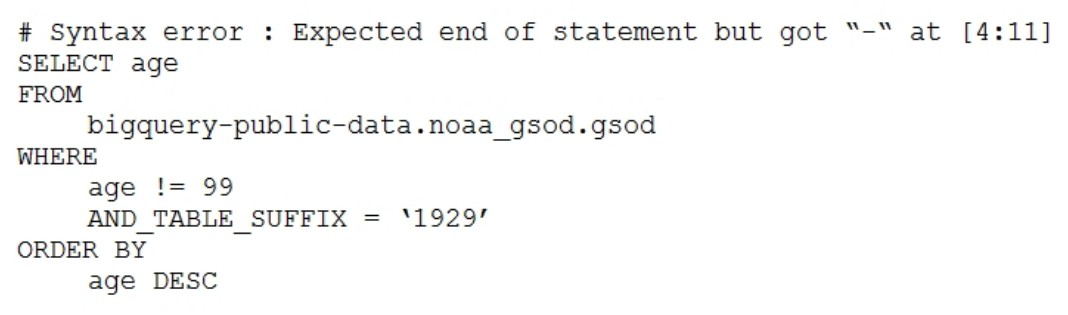
Your company is using WILDCARD tables to query data across multiple tables with similar names. The SQL statement is currently failing with the following error:
Which table name will make the SQL statement work correctly?
Show answer and explanation
Correct answer: D. 'bigquery-public-data.noaa_gsod.gsod*`
A wildcard table reference must be written as a single quoted identifier with the asterisk inside the backticks, as in `bigquery-public-data.noaa_gsod.gsod*`. Backticks are mandatory here because the project ID contains hyphens, which is exactly what produced the 'Expected end of statement but got -' error. With the whole reference enclosed, BigQuery matches all gsod tables and the _TABLE_SUFFIX filter selects the 1929 table.
Why the other options are wrong
- A. It quotes a plain table name with no asterisk, so no wildcard matching occurs and _TABLE_SUFFIX is unavailable.
- B. Leaving the reference unquoted makes the parser read the hyphens in the project ID as subtraction, which is the original syntax error.
- C. Placing the asterisk outside the closing quote leaves the wildcard out of the table identifier and is not valid syntax.
Question 10
Your company is in a highly regulated industry. One of your requirements is to ensure individual users have access only to the minimum amount of information required to do their jobs. You want to enforce this requirement with Google BigQuery.
Which three approaches can you take? (Choose three.)
Show answer and explanation
Correct answer: B, D, E
B. Restrict access to tables by role. D. Restrict BigQuery API access to approved users. E. Segregate data across multiple tables or databases. To implement least-privilege access in BigQuery, you must restrict access to tables by role (B), allowing different users different permissions based on their job function. Segregating data across multiple tables or databases (E) ensures users only see data relevant to their work. Restricting BigQuery API access to approved users (D) adds an additional layer by controlling who can even connect to BigQuery. These three approaches work together to enforce minimum-necessary-access principles. Disabling writes (A) doesn't restrict read access. Encryption (C) protects data in transit and at rest but doesn't control who sees what. Audit logging (F) records violations after they occur rather than preventing them.
Why the other options are wrong
- A. Disabling writes controls modification permissions but does not restrict who can read sensitive data.
- C. Encryption protects data confidentiality but does not enforce access control based on user roles or job function.
- F. Audit logging detects and records policy violations after they happen, rather than preventing unauthorized access.
That was 10 of 349.
The full Google Professional Data Engineer pack has all 349 questions, each with the answer, the explanation and why the other options are wrong, plus a questions-only copy for timed runs. US$39, paid once, with free monthly updates and a pass-or-your-money-back guarantee.