
10 free Google Professional Cloud Developer practice questions with the correct answer and a full explanation for each, taken from the CertStash pack of 379 questions. Work through them, then open each answer to check your reasoning.
Get all 379 questions (US$39) · Download these 10 as a PDF
Question 1
You want to upload files from an on-premises virtual machine to Google Cloud Storage as part of a data migration. These files will be consumed by Cloud DataProc Hadoop cluster in a GCP environment.
Which command should you use?
Show answer and explanation
Correct answer: A. gsutil cp [LOCAL_OBJECT] gs://[DESTINATION_BUCKET_NAME]/
gs://[DESTINATION_BUCKET_NAME]/ gsutil is the correct command-line tool for transferring files to and from Google Cloud Storage. The cp subcommand copies files, and the gs:// URI scheme specifies the Cloud Storage bucket destination. This is the standard tool used for data migration to GCS, including data that will be consumed by DataProc clusters.
Why the other options are wrong
- B. gcloud cp is not a valid command; gcloud does not have a cp subcommand for file transfers.
- C. hadoop fs cp is a Hadoop command that works with HDFS and Hadoop-compatible filesystems, not the primary tool for uploading from on-premises to GCS.
- D. gcloud dataproc cp is not a valid command; DataProc does not have a cp subcommand for file transfers.
Question 2
You migrated your applications to Google Cloud Platform and kept your existing monitoring platform. You now find that your notification system is too slow for time critical problems.
What should you do?
Show answer and explanation
Correct answer: C. Use Stackdriver to capture and alert on logs, then ship them to your existing platform.
ship them to your existing platform. When keeping an existing monitoring platform while using GCP resources, the optimal approach is to use Stackdriver to capture logs and alerts, then forward this data to your existing platform. This provides the speed and native GCP integration of Stackdriver for alerting while maintaining your existing monitoring infrastructure and avoiding the cost and effort of a complete platform replacement.
Why the other options are wrong
- A. Replacing the entire monitoring platform is unnecessarily disruptive and costly when your existing platform can still serve a purpose in a hybrid setup.
- B. Installing only agents does not solve the core problem of slow notifications; you still need a faster alerting mechanism integrated with GCP.
- D. AB testing between platforms and migrating traffic back is operationally complex and does not address the slow notification problem.
Question 3
You are planning to migrate a MySQL database to the managed Cloud SQL database for Google Cloud. You have Compute Engine virtual machine instances that will connect with this Cloud SQL instance. You do not want to whitelist IPs for the Compute Engine instances to be able to access Cloud SQL.
What should you do?
Show answer and explanation
Correct answer: A. Enable private IP for the Cloud SQL instance.
Enabling private IP for a Cloud SQL instance allows Compute Engine instances in the same VPC network to connect without requiring IP whitelisting. This is the modern, secure approach that eliminates the need for public IP exposure and whitelist management while maintaining internal connectivity within Google Cloud.
Why the other options are wrong
- B. IP whitelisting is the opposite of what the requirement asks for; the goal is to avoid whitelisting IPs.
- C. Cloud SQL does not use roles to grant database access from external instances; roles control IAM permissions on the Cloud SQL instance itself, not network access.
- D. Creating a VPN between projects is unnecessarily complex when both resources are in Google Cloud; private IP is the simpler, native solution.
Question 4
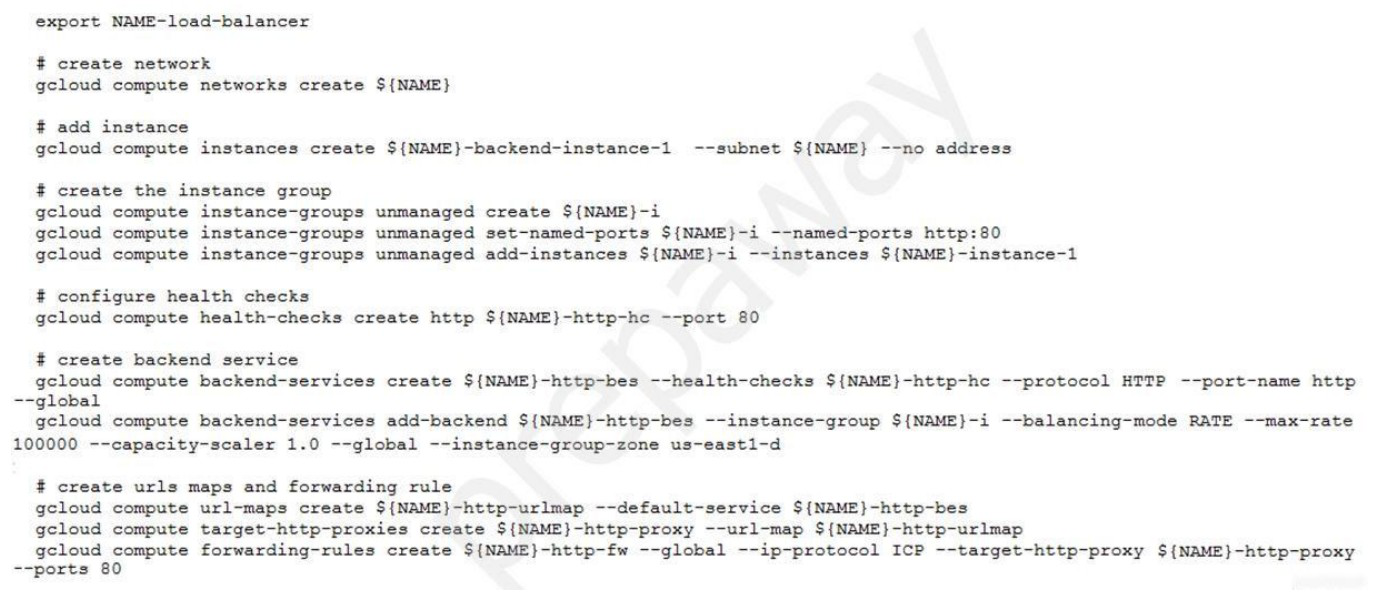
You have deployed an HTTP(s) Load Balancer with the gcloud commands shown below.
Health checks to port 80 on the Compute Engine virtual machine instance are failing and no traffic is sent to your instances. You want to resolve the problem.
Which commands should you run?
Show answer and explanation
Correct answer: C. gcloud compute firewall-rules create allow-lb –network LoadBalancer –allow tcp — source-ranges 130.211.0.0/22,35.191.0.0/16 –direction INGRESS
network LoadBalancer –allow tcp –source-ranges 130.211.0.0/22,35.191.0.0/16 — direction INGRESS The health checks are failing because the load balancer's health check probes cannot reach the backend instances on port 80. Google Cloud Load Balancers use specific IP ranges (130.211.0.0/22 and 35.191.0.0/16) to perform health checks. A firewall rule must be created to allow ingress traffic from these health check IP ranges to the backend instances. Option C correctly creates an INGRESS firewall rule allowing TCP traffic from the Google Cloud health check ranges to reach the instances, which is necessary for health checks to succeed and traffic to be routed to the backends.
Why the other options are wrong
- A. Adding an access config provides external IP connectivity but does not solve the firewall blocking issue preventing health checks from reaching the instances.
- B. Adding the http-server tag is irrelevant; the problem is firewall rules blocking traffic, not instance tags or network configuration.
- D. This specifies EGRESS direction with destination-ranges, which is incorrect; health check traffic originates from Google's infrastructure (source) and must be allowed INGRESS to the instances, not egress from them.
Question 5
Your website is deployed on Compute Engine. Your marketing team wants to test conversion rates between 3 different website designs.
Which approach should you use?
Show answer and explanation
Correct answer: A. Deploy the website on App Engine and use traffic splitting.
splitting. App Engine supports traffic splitting to route different percentages of traffic to different versions of an application, making it ideal for conversion rate testing between multiple website designs. This feature allows you to gradually shift traffic between variants and measure performance metrics.
Why the other options are wrong
- B. Deploying as three separate services would require additional infrastructure to route traffic between them and complicates comparison metrics.
- C. Cloud Functions is not designed for website deployment; it is intended for event- driven, serverless workloads, not continuous web serving.
- D. Cloud Functions cannot serve a website effectively and does not provide traffic splitting capabilities for testing.
Question 6
You need to copy directory local-scripts and all of its contents from your local workstation to a Compute Engine virtual machine instance.
Which command should you use?
Show answer and explanation
Correct answer: C. gcloud compute scp –project "my-gcp-project" –recurse ~/local-scripts/ gcp- instance-name:~/server-scripts/ –zone "us-east1-b"
recurse ~/local-scripts/ gcp-instance-name:~/server-scripts/ –zone "us-east1-b" gcloud compute scp is the correct command for copying files to Compute Engine instances. The –recurse flag enables recursive directory copying, equivalent to scp -r. This command handles authentication and zone specification properly for GCP resources.
Why the other options are wrong
- A. gsutil is for Cloud Storage operations, not for copying files to Compute Engine instances, and does not support the syntax shown.
- B. gsutil does not support the –recurse flag with the -R option in this context, and is not the appropriate tool for Compute Engine file transfers.
- D. gcloud compute mv is for moving/renaming resources within GCP, not for copying files from local workstations to instances.
Question 7
You are deploying your application to a Compute Engine virtual machine instance with the Stackdriver Monitoring Agent installed. Your application is a unix process on the instance. You want to be alerted if the unix process has not run for at least 5 minutes. You are not able to change the application to generate metrics or logs.
Which alert condition should you configure?
Show answer and explanation
Correct answer: B. Process health
Process health alerts are designed to monitor whether a specific unix process is running on a Compute Engine instance. The Stackdriver Monitoring Agent can track process status and trigger alerts when a process has not run for a specified duration, which directly addresses the requirement to alert if a process has not run for 5 minutes.
Why the other options are wrong
- A. Uptime checks monitor HTTP endpoints or TCP ports, not individual unix processes.
- C. Metric absence alerts when a metric stops being reported, but process health is the dedicated feature for monitoring process status.
- D. Metric threshold alerts when a metric crosses a value threshold, not when a process ceases to run.
Question 8
You have two tables in an ANSI-SQL compliant database with identical columns that you need to quickly combine into a single table, removing duplicate rows from the result set.
What should you do?
Show answer and explanation
Correct answer: C. Use the UNION operator in SQL to combine the tables.
tables. The UNION operator combines result sets from multiple queries and automatically removes duplicate rows, making it the correct choice for combining two tables with identical columns while eliminating duplicates.
Why the other options are wrong
- A. JOIN combines tables based on matching conditions but is used to merge columns, not rows, and does not simply combine entire tables.
- B. Nested WITH statements (CTEs) are used for query organization and readability, not for combining multiple tables into a single result set.
- D. UNION ALL combines tables but retains all duplicate rows; since duplicates should be removed, UNION is correct.
Question 9
You have an application deployed in production.
When a new version is deployed, some issues don't arise until the application receives traffic from users in production. You want to reduce both the impact and the number of users affected.
Which deployment strategy should you use?
Show answer and explanation
Correct answer: B. Canary deployment
Canary deployment gradually rolls out a new version to a small percentage of users first, allowing issues to be detected with minimal impact before full rollout. This strategy reduces both the number of affected users and the overall impact by catching problems early in a controlled manner.
Why the other options are wrong
- A. Blue/green deployment switches all traffic at once between two versions, which does not reduce the impact when issues arise; all users are affected simultaneously.
- C. Rolling deployment gradually replaces instances but does not control traffic distribution; issues still reach a large user base quickly.
- D. Recreate deployment stops all instances and starts new ones, causing downtime and maximum impact if problems occur.
Question 10
Your company wants to expand their users outside the United States for their popular application. The company wants to ensure 99.999% availability of the database for their application and also wants to minimize the read latency for their users across the globe.
Which two actions should they take? (Choose two.)
Show answer and explanation
Correct answer: A, C
A. Create a multi-regional Cloud Spanner instance with "nam-asia-eur1" configuration. C. Create a cluster with at least 3 Spanner nodes. To achieve 99.999% availability globally while minimizing read latency, you need both multi-regional replication and sufficient node capacity. Option A creates a multi-regional Cloud Spanner instance with the 'nam-asia-eur1' configuration, which spans North America, Asia, and Europe to provide high availability and low latency across these regions. Option C requires at least 3 Spanner nodes to meet the 99.999% availability SLA (three nodes provide sufficient redundancy and fault tolerance). Together, these options deliver both the geographic distribution needed for low read latency worldwide and the node capacity required for the five-nines availability guarantee.
Why the other options are wrong
- B. The 'nam3' configuration is a regional configuration (North America only), not multi- regional, and cannot serve users globally with low latency.
- D. A single node cannot provide 99.999% availability; you need minimum 3 nodes to meet this SLA requirement.
- E. Creating separate instances in different regions creates isolated databases without automatic replication, requiring manual synchronization and not achieving true 99.999% availability.
- F. Dataflow is for batch data processing; it is not designed for real-time database replication and does not provide the consistency guarantees needed for a transactional database.
That was 10 of 379.
The full Google Professional Cloud Developer pack has all 379 questions, each with the answer, the explanation and why the other options are wrong, plus a questions-only copy for timed runs. US$39, paid once, with free monthly updates and a pass-or-your-money-back guarantee.