
10 free EC-Council 312-49v11 CHFI v11 practice questions with the correct answer and a full explanation for each, taken from the CertStash pack of 452 questions. Work through them, then open each answer to check your reasoning.
Get all 452 questions (US$39) · Download these 10 as a PDF
Question 1
A suspect is accused of violating the acceptable use of computing resources, as he has visited adult websites and downloaded images. The investigator wants to demonstrate that the suspect did indeed visit these sites. However, the suspect has cleared the search history and emptied the cookie cache. Moreover, he has removed any images he might have downloaded.
What can the investigator do to prove the violation?
Show answer and explanation
Correct answer: A. Image the disk and try to recover deleted files
Clearing history, cookies and deleting downloaded images only removes the file references, so the underlying data stays on the disk until it is overwritten. Creating a forensic image of the drive and carving unallocated space and slack space allows the investigator to recover the deleted images, browser cache remnants and index files. That recovered content is direct evidence that the suspect visited the sites and downloaded the material.
Why the other options are wrong
- B. Co-worker statements depend on memory and availability and cannot establish which sites were visited or what was downloaded, so they do not substitute for forensic artifacts on the machine.
- C. Registry artifacts such as typed URLs may hint at activity but they are incomplete and do not recover the downloaded images themselves.
- D. Website administrators may not retain logs, are often outside the investigator's jurisdiction, and obtaining their records requires a legal process, while the suspect's own disk holds the evidence.
Question 2
You have been asked to investigate the possibility of computer fraud in the finance department of a company. It is suspected that a staff member has been committing finance fraud by printing cheques that have not been authorized. You have exhaustively searched all data files on a bitmap image of the target computer, but have found no evidence. You suspect the files may not have been saved.
What should you examine next in this case?
Show answer and explanation
Correct answer: B. The swap file
When searching data files yields no evidence of unauthorized cheques, the next logical location is the swap file (also called virtual memory or page file). The swap file contains data that was in RAM but not yet saved to disk, including active documents and files being edited. If the suspect was composing or printing cheques without saving them to permanent storage, traces of this activity would exist in the swap file.
Why the other options are wrong
- A. The registry stores configuration and system settings, not typically the content of unsaved documents.
- C. The recycle bin contains deleted files that were saved; this investigation already found no evidence in saved files.
- D. Metadata describes file properties but does not contain the actual content of unsaved documents.
Question 3
Which of the following are small pieces of data sent from a website and stored on the user’s computer by the user’s web browser to track, validate, and maintain specific user information?
Show answer and explanation
Correct answer: C. Cookies
Cookies are small text files created by websites and stored on the user's computer by the web browser. They are designed to track user activity, maintain session information, validate credentials, and store user preferences. Cookies persist across browser sessions and are a key forensic artifact for demonstrating web browsing activity.
Why the other options are wrong
- A. Temporary files are cache files but are broader in scope and not specifically designed for tracking and user validation.
- B. Open files refers to files currently accessed by running processes, not stored data from websites.
- D. Web browser cache stores downloaded web page content and images but is not used for user tracking and validation in the same way cookies are.
Question 4
Depending upon the jurisdictional areas, different laws apply to different incidents.
Which of the following law is related to fraud and related activity in connection with computers?
Show answer and explanation
Correct answer: B. 18 USC §1030
18 USC §1030 is the Computer Fraud and Abuse Act, titled "Fraud and related activity in connection with computers." It covers unauthorized access to protected computers, obtaining information without authorization, trafficking in passwords, transmitting damaging code and extortion involving computers. It is the primary US federal statute cited for computer fraud offenses.
Why the other options are wrong
- A. 18 USC §1029 covers fraud and related activity in connection with access devices such as credit cards, account numbers and telecommunications instruments.
- C. 18 USC §1361 covers malicious mischief involving injury to or depredation against government property.
- D. 18 USC §1371 is not the provision that addresses computer fraud offenses.
Question 5
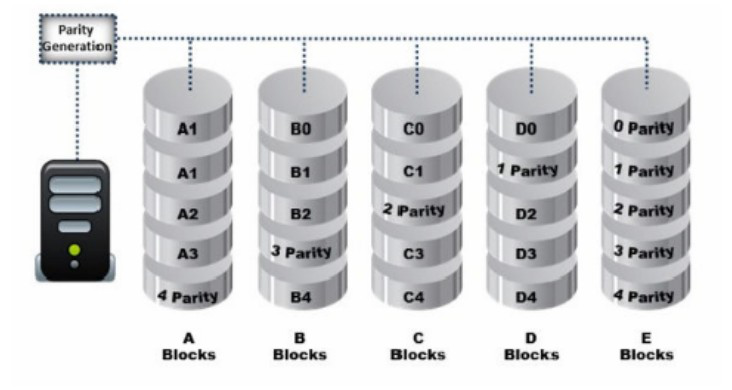
Data is striped at a byte level across multiple drives, and parity information is distributed among all member drives.
What RAID level is represented here?
Show answer and explanation
Correct answer: B. RAID Level 5
CHFI courseware describes RAID Level 5 as striping data across multiple drives with parity information distributed among all member drives rather than held on one dedicated disk. The exhibit matches this: each drive carries data blocks and a share of the parity, with the parity position rotating across the array. This layout gives fault tolerance because any single failed drive can be rebuilt from the remaining data and parity.
Why the other options are wrong
- A. RAID Level 0 stripes data only and generates no parity, so it provides no fault tolerance and could not produce the parity segments shown.
- C. RAID Level 3 stripes at byte level but stores all parity on a single dedicated parity drive, which does not match parity distributed across every member drive.
- D. RAID Level 1 mirrors identical copies of data between drives and performs no striping or parity calculation.
Question 6
Charles has accidentally deleted an important file while working on his Mac computer. He wants to recover the deleted file as it contains some of his crucial business secrets.
Which of the following tool will help Charles?
Show answer and explanation
Correct answer: C. FileSalvage
FileSalvage is a specialized data recovery tool designed for macOS systems. It recovers deleted files from HFS and HFS+ file systems commonly used on Mac computers. Charles needs a tool compatible with his Mac operating system to recover accidentally deleted files.
Why the other options are wrong
- A. Xplico is a network forensics tool used for packet capture and analysis, not file recovery.
- B. Colasoft's Capsa is a network analysis and packet sniffing tool, not a file recovery utility.
- D. DriveSpy is designed for Windows systems and does not support macOS file recovery.
Question 7
Jason discovered a file named $RIYG6VR.doc in the C:$Recycle.Bin<USER SID> while analyzing a hard disk image for the deleted data.
What inferences can he make from the file name?
Show answer and explanation
Correct answer: D. It is a deleted doc file
Files in the Windows Recycle Bin are renamed with a random character sequence (like $RIYG6VR) and stored with a .doc extension. From the filename alone, Jason can only definitively determine that this is a deleted document file. The random prefix does not indicate deletion order, the original filename is not preserved in this notation, and the drive letter designation is not encoded in this naming scheme, the location in the Recycle Bin path is what indicates it was deleted.
Why the other options are wrong
- A. The dollar sign prefix and random string do not indicate sequential deletion order.
- B. The original filename (RIYG6VR.doc) is not recoverable from this Recycle Bin entry name alone.
- C. The drive letter from which the file was deleted cannot be inferred from the filename; the path location indicates it is from the system drive.
Question 8
Which of the following attacks allows an attacker to access restricted directories, including application source code, configuration and critical system files, and to execute commands outside of the web server’s root directory?
Show answer and explanation
Correct answer: C. Directory traversal
Directory traversal attacks (also called path traversal) exploit insufficient input validation to allow attackers to navigate outside the web server's intended root directory. This enables access to restricted directories, application source code, configuration files, and sensitive system files, as well as execution of arbitrary commands outside the web root using path manipulation techniques like ../ sequences.
Why the other options are wrong
- A. Parameter/form tampering involves modifying form fields and URL parameters but does not specifically enable directory navigation outside the web root.
- B. Unvalidated input is a broader vulnerability category; directory traversal is a specific type of attack exploiting unvalidated path input.
- D. Security misconfiguration refers to insecure default settings and configurations but is not the specific attack mechanism for accessing restricted directories.
Question 9
Annie is searching for certain deleted files on a system running Windows XP OS.
Where will she find the files if they were not completely deleted from the system?
Show answer and explanation
Correct answer: C. C:RECYCLER
Windows XP stores deleted items in the hidden C:RECYCLER folder, which contains a subfolder named for each user's SID. Inside, the deleted files are renamed in a Dc# format and the original names, paths and deletion times are tracked in the INFO2 file. Annie should examine C:RECYCLER and its INFO2 records to locate and identify the deleted files.
Why the other options are wrong
- A. $Recycled.Bin is not a valid Windows recycle bin folder name.
- B. $Recycle.Bin is the recycle bin folder introduced with Windows Vista and used in later versions, not on Windows XP.
- D. $RECYCLER is not a valid path; the Windows XP folder is RECYCLER with no dollar sign.
Question 10
Which of the following files stores information about a local Google Drive installation such as User email ID, Local Sync Root Path, and Client version installed?
Show answer and explanation
Correct answer: D. Sync_config.db
Sync_config.db is the configuration database file used by Google Drive to store local installation information including the user's email ID, the local sync root path where files are synchronized, and the version number of the Google Drive client installed on the system. This file contains essential metadata about the Google Drive installation's configuration and state.
Why the other options are wrong
- A. filecache.db stores cached file data and metadata for Google Drive's local cache, not installation configuration information.
- B. config.db is not the standard configuration file used by Google Drive for storing installation and sync parameters.
- C. sigstore.db is used for storing signature and verification information, not for Google Drive installation configuration details.
That was 10 of 452.
The full EC-Council 312-49v11 CHFI v11 pack has all 452 questions, each with the answer, the explanation and why the other options are wrong, plus a questions-only copy for timed runs. US$39, paid once, with free monthly updates and a pass-or-your-money-back guarantee.