

GOOGLE · Associate Data Practitioner

Google Associate Data Practitioner Exam Practice Questions

103 questionsPDF by emailUpdated September 2026

US$39

Try 10 questions free

Card, Apple Pay or Google Pay. Your PDF is sent by email as soon as you check out.

Pass or your money backFail the exam after using this pack and we refund it. How the guarantee works
Category:
TRY BEFORE YOU BUY

Three of the 103 questions in this pack

Question 1

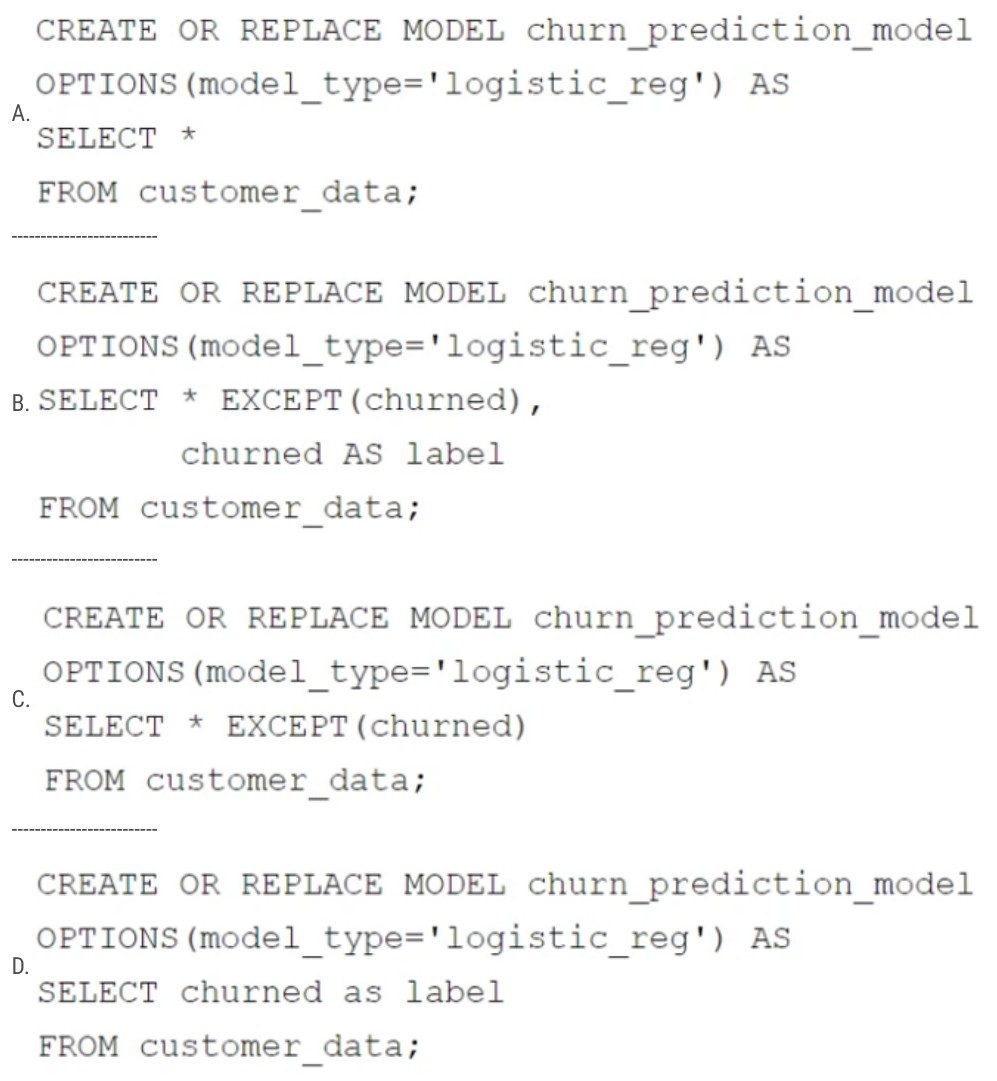
Your retail company wants to predict customer churn using historical purchase data stored in BigQuery. The dataset includes customer demographics, purchase history, and a label indicating whether the customer churned or not. You want to build a machine learning model to identify customers at risk of churning. You need to create and train a logistic regression model for predicting customer churn, using the customer_data table with the churned column as the target label.

Which BigQuery ML query should you use?

Exhibit for question 1

Show answer and explanation

Correct answer: B. CREATE OR REPLACE MODEL

churn_prediction_model OPTIONS(model_type='logistic_reg') AS SELECT * EXCEPT(churned), churned AS label FROM customer_data; BigQuery ML requires the target label column to be explicitly aliased as 'label' in the SELECT statement. Option B correctly uses SELECT * EXCEPT(churned) to include all features except the target column, then explicitly aliases churned AS label, which tells the model which column contains the target variable for the logistic regression. This is the proper syntax for creating a supervised learning model in BigQuery ML.

Why the other options are wrong

  • A. Selects all columns including churned without aliasing it as label, so BigQuery ML cannot identify the target variable.
  • C. Excludes the churned column entirely but never defines it as a label, so there is no target variable for the model to predict.
  • D. Selects only the churned column and no features, leaving no predictor variables for the model to learn from.

Question 2

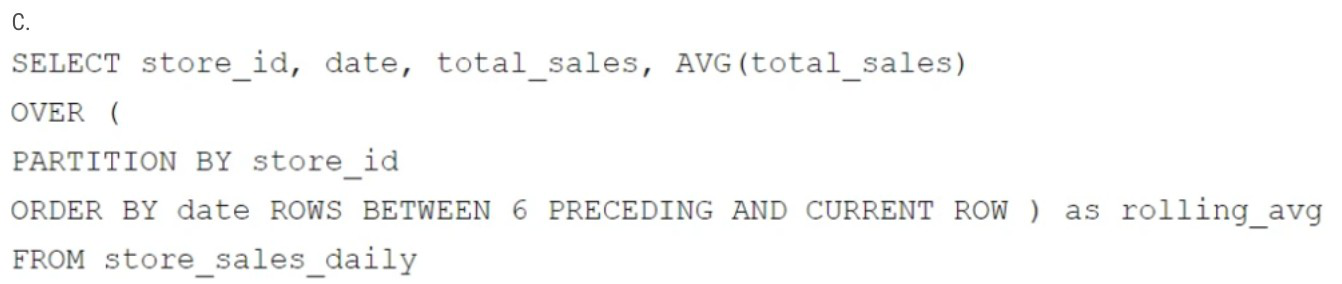
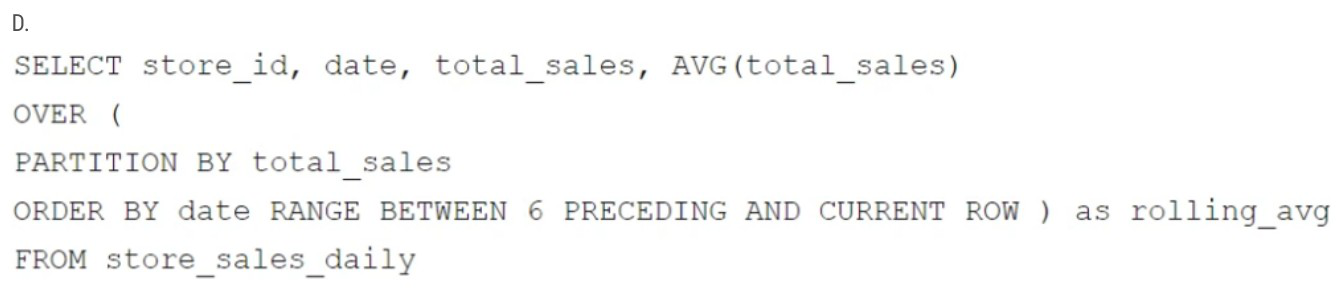
Your company has several retail locations. Your company tracks the total number of sales made at each location each day. You want to use SQL to calculate the weekly moving average of sales by location to identify trends for each store.

Which query should you use?

Exhibit for question 2

Exhibit for question 2

Exhibit for question 2

Exhibit for question 2

Show answer and explanation

Correct answer: C. SELECT store_id, date, total_sales, AVG(total_sales)

OVER (PARTITION BY store_id ORDER BY date ROWS BETWEEN 6 PRECEDING AND CURRENT ROW ) as rolling_avg FROM store_sales_daily To calculate a weekly moving average of sales by location, the query must partition by store_id to separate data for each store, and order by date to establish the temporal sequence needed for the rolling window. The ROWS BETWEEN 6 PRECEDING AND CURRENT ROW frame specification calculates the average across the current row plus 6 preceding rows (7 days total for a weekly average). Option C correctly uses PARTITION BY store_id and ORDER BY date with ROWS BETWEEN 6 PRECEDING AND CURRENT ROW, which properly computes the rolling average trend for each store over time.

Why the other options are wrong

  • A. Uses ORDER BY total_sales instead of ORDER BY date, which breaks the temporal ordering needed for a moving average and uses RANGE instead of ROWS.
  • B. Partitions by date instead of store_id, which groups by date rather than by individual store locations, defeating the purpose of tracking trends per store.
  • D. Partitions by total_sales instead of store_id, which groups by sales amount rather than by store, and uses RANGE which is inappropriate for row-based moving averages.

Question 3

Your company is building a near real-time streaming pipeline to process JSON telemetry data from small appliances. You need to process messages arriving at a Pub/Sub topic, capitalize letters in the serial number field, and write results to BigQuery. You want to use a managed service and write a minimal amount of code for underlying transformations.

What should you do?

  1. Use a Pub/Sub to BigQuery subscription, write results directly to BigQuery, and schedule a transformation query to run every five minutes.
  2. Use a Pub/Sub to Cloud Storage subscription, write a Cloud Run service that is triggered when objects arrive in the bucket, performs the transformations, and writes the results to BigQuery.
  3. Use the “Pub/Sub to BigQuery” Dataflow template with a UDF, and write the results to BigQuery.
  4. Use a Pub/Sub push subscription, write a Cloud Run service that accepts the messages, performs the transformations, and writes the results to BigQuery.
Show answer and explanation

Correct answer: C. Use the “Pub/Sub to BigQuery” Dataflow template with a UDF, and write the results to BigQuery.

with a UDF, and write the results to BigQuery. The Pub/Sub to BigQuery Dataflow template is a managed service designed specifically for this use case. It processes streaming JSON messages from Pub/Sub topics, applies transformations via User-Defined Functions (UDFs) written in SQL, and writes results directly to BigQuery. This requires minimal code, maintains near real-time processing, and is fully managed by Google Cloud. The UDF capability allows you to capitalize the serial number field with simple SQL logic without building a custom pipeline.

Why the other options are wrong

  • A. Direct Pub/Sub to BigQuery subscriptions do not support transformations; running transformation queries every five minutes introduces latency and is not near real-time.
  • B. Using Cloud Storage as an intermediary adds unnecessary latency and complexity; Cloud Run triggers add operational overhead compared to a managed template.
  • D. Writing a custom Cloud Run service requires more code and operational management than using a managed Dataflow template designed for this pattern.

See all 10 free questions Get the full pack, US$39

103 practice questions for Google Cloud Associate Data Practitioner certification, with full explanations.

Every question comes with the correct answer, the reasoning behind it, and a short note on why each wrong option is wrong. Work through it once with the answers, then again with the questions-only copy under exam conditions.

  • 103 questions mapped to the Associate Data Practitioner exam guide
  • Answers and explanations for every question, including the wrong options
  • A questions-only PDF for timed practice runs
  • Instant delivery by email the moment you check out
  • Free monthly updates for as long as the exam is live
  • Pass or your money back

An Associate Data Practitioner attempt costs US$125. This pack is US$39, paid once.

Try 10 questions free before you buy.

Last updated September 2026 · 103 questions

What makes the Associate Data Practitioner exam hard

Associate Data Practitioner is the entry point to Google’s data track, sitting below the Professional Data Engineer, and it is a product-selection exam. Almost every question describes a data need and asks which Google Cloud service fits, so the marks go to people who know the difference between Dataflow and Data Fusion, BigQuery and Bigtable, Composer and scheduled queries, not to people who can write the pipeline.

Data Preparation and Ingestion is about 30% of the exam: ETL versus ELT versus ETLT, choosing between Cloud Storage, BigQuery, Cloud SQL, Firestore, Bigtable, Spanner and AlloyDB, and the right regional, dual-regional or multi-regional location. Data Analysis and Presentation at about 27% covers BigQuery SQL, Looker versus Looker Studio, and BigQuery ML.

Data Management at about 25% covers IAM roles, storage classes and lifecycle rules, backup and replication, and CMEK, CSEK and GMEK with Cloud KMS. Data Pipeline Orchestration at about 18% covers choosing between Dataproc, Dataflow, Data Fusion, Composer and Dataform, plus event-driven pipelines with Pub/Sub and Eventarc.

About the exam

The Google Cloud Associate Data Practitioner certification covers data preparation and ingestion, data analysis and presentation with BigQuery, Looker and BigQuery ML, data pipeline orchestration, and data management including access control, lifecycle, high availability and encryption. There are no prerequisites; Google recommends six or more months of experience with Google Cloud data services.

Exam sections

  • Data Preparation and Ingestion: about 30%
  • Data Analysis and Presentation: about 27%
  • Data Pipeline Orchestration: about 18%
  • Data Management: about 25%

50 to 60 multiple choice and multiple select questions, 120 minutes, US$125 per attempt, online proctored or at a test centre, certification valid for three years. Google does not publish a fixed passing score.

Reviews

There are no reviews yet.

Only logged in customers who have purchased this product may leave a review.

Questions before you buy

What do I get when I buy the Google Associate Data Practitioner pack?

103 practice questions as a PDF, each with the correct answer, a full explanation and a note on why the other options are wrong, plus a separate questions-only PDF for timed practice.

How quickly do I receive it?

Your PDF is prepared and sent to your email address after checkout, and you get a confirmation as soon as it is on its way.

Is there a free sample?

Yes. Ten questions from this pack, with answers and explanations, are free on this page and as a PDF, so you can judge the quality before you pay.

Are updates included?

Yes. The pack is updated every month for as long as the exam is live, and updates are free for everyone who has bought it.

What if I fail the exam?

We refund the pack. Sit the exam 7 to 30 days after buying, then send your official score report within 7 days of the exam date, as set out in the refund policy.

Can I share it with colleagues?

Each purchase is licensed to one person. For a team, school or training organisation, email support@certstash.com for a licence that fits.