
10 free Python Institute PCEP-30-02 practice questions with the correct answer and a full explanation for each, taken from the CertStash pack of 481 questions. Work through them, then open each answer to check your reasoning.
Get all 481 questions (US$39) · Download these 10 as a PDF
Question 1
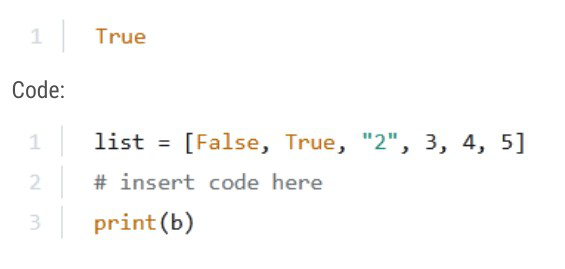
Insert the correct snippet so that the program produces the expected output.
Expected output:
Code:
Show answer and explanation
Correct answer: C. b = 0 in list
The expected output is 'True', which means the code snippet must produce a boolean True value that gets printed. Option C, 'b = 0 in list', checks if the integer 0 is a member of the list. Since list[0] is False (which is equivalent to 0 in Python), the expression '0 in list' evaluates to True because False == 0 in Python's type system, making this the correct answer.
Why the other options are wrong
- A. The expression '0 not in list' would evaluate to False (since 0 is in the list via False), not True.
- B. Assigning b = list[0] sets b to False, and printing False outputs 'False', not 'True'.
- D. Assigning b = False directly outputs 'False' when printed, not 'True'.
Question 2
Assuming that the tuple is a correctly created tuple, the fact that tuples are immutable means that the following instruction:

Show answer and explanation
Correct answer: A. is illegal
Tuples in Python are immutable, meaning their elements cannot be modified after creation. The instruction attempts to reassign my_tuple[1] by adding to it, which violates the immutability constraint. Python will raise a TypeError: 'tuple' object does not support item assignment, making this operation illegal regardless of the tuple's contents or length.
Why the other options are wrong
- B. The type of elements (strings or otherwise) is irrelevant; the immutability of tuples themselves prevents any item reassignment.
- C. The tuple can have any number of elements (including zero or one), but the operation remains illegal due to tuple immutability, not based on element count.
- D. The code is not correct; attempting to modify a tuple element will always raise a TypeError in Python.
Question 3
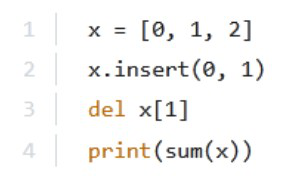
What is the expected output of the following code?
Show answer and explanation
Correct answer: B. 4
Starting with x = [0, 1, 2], the insert(0, 1) method inserts the value 1 at index 0, making x = [1, 0, 1, 2]. Then del x[1] deletes the element at index 1 (the value 0), leaving x = [1, 1, 2]. Finally, sum(x) adds these elements: 1 + 1 + 2 = 4.
Why the other options are wrong
- A. The sum of [1, 1, 2] is 4, not 2.
- C. This would require a different sequence of operations or initial values.
- D. The sum is not 3; the correct calculation yields 4.
Question 4
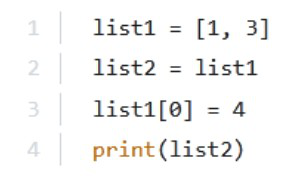
What is the expected output of the following code?
Show answer and explanation
Correct answer: C. [4, 3]
Line 1 creates list1 = [1, 3]. Line 2 assigns list2 = list1, which makes list2 reference the same list object as list1 (not a copy). Line 3 modifies list1[0] = 4, changing the first element to 4. Since list2 points to the same list object, this change affects both variables. Line 4 prints list2, which now contains [4, 3].
Why the other options are wrong
- A. This ignores that list1[0] was reassigned to 4 on line 3, which affects list2 since they reference the same object.
- B. This would require list2 to be a separate copy of list1, but the assignment on line 2 creates an alias, not a copy.
- D. This suggests a new element 4 was appended, but line 3 replaces the element at index 0 rather than adding a new element.
Question 5
What is the expected output of the following code?

Show answer and explanation
Correct answer: C. [404, 3.03]
In Python, list slicing uses the syntax list[start:end], where start is inclusive and end is exclusive. The code data[1:3] starts at index 1 ('Peter' is at index 0, so index 1 is 404) and goes up to but not including index 3 (index 3 is 'Wellert'). Therefore, data[1:3] returns the elements at indices 1 and 2, which are [404, 3.03].
Why the other options are wrong
- A. This is the entire list, not a slice from index 1 to 3.
- B. This is incorrect because the code produces a specific, valid output.
- D. This would be data[0:4:2] or a different slice pattern; data[1:3] includes numeric values at indices 1 and 2, not the string values.
Question 6
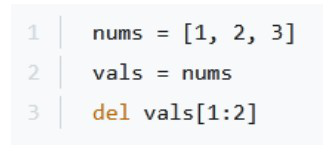
Take a look at the snippet, and choose the true statements: (Choose two.)
Show answer and explanation
Correct answer: B, D
B. nums and vals are of the same length D. nums and vals refer to the same list Line 1 creates nums as [1, 2, 3]. Line 2 assigns vals = nums, which makes vals reference the same list object as nums, not a copy. Line 3 deletes the element at index 1 (value 2) from vals, resulting in [1, 3]. Since vals and nums refer to the same list object, this deletion affects both variables equally. After the deletion, both nums and vals contain [1, 3], making them the same length (2 elements) and referring to the same list object in memory.
Why the other options are wrong
- A. nums is not longer than vals; they are the same length after the deletion operation.
- C. vals is not longer than nums; after deletion, both contain 2 elements.
Question 7
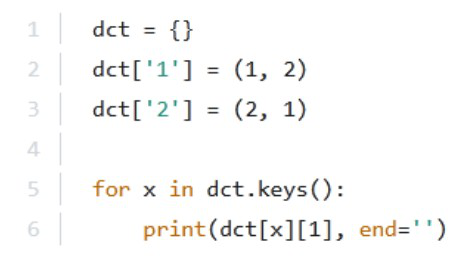
What is the output of the following snippet?
Show answer and explanation
Correct answer: D. 21
The code creates a dictionary with string keys '1' and '2', where dct['1'] = (1, 2) and dct['2'] = (2, 1). The loop iterates through dct.keys() in insertion order, so x takes values '1' then '2'. For each iteration, print(dct[x][1], end='') prints the second element of the tuple at index [1]. When x='1', dct['1'][1] = 2; when x='2', dct['2'][1] = 1. With end='' (no spaces or newlines between prints), the output is '2' followed by '1', resulting in '21'.
Why the other options are wrong
- A. This would require printing only single digits without the second iteration or concatenation logic.
- B. This is the value of dct['2'], not what gets printed by accessing the [1] index of each tuple.
- C. This is the value of dct['1'], not what the loop prints; the loop iterates through both keys.
Question 8
What is the expected output of the following code? print(list('hello'))
Show answer and explanation
Correct answer: C. ['h', 'e', 'l', 'l', 'o']
list('hello') splits the string into single characters. print() displays a list using repr() for each element, so every character is shown in quotes and separated by commas: ['h', 'e', 'l', 'l', 'o'].
Why the other options are wrong
- A. Printing the string itself gives this; list() splits it into characters.
- B. print shows each element with its quotes, so this is not the output.
- D. print separates elements with commas; this is not the output.
- E. One listed option matches the output exactly.
Question 9
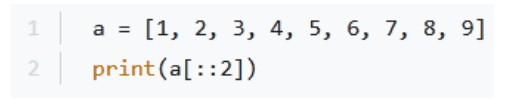
What will be the output of the following code snippet?
Show answer and explanation
Correct answer: A. [1, 3, 5, 7, 9]
The slice notation `a[::2]` means start from the beginning (default 0), go to the end (default length), with a step of 2. This selects every second element starting from index 0. Applied to the list [1, 2, 3, 4, 5, 6, 7, 8, 9], this returns elements at indices 0, 2, 4, 6, 8, which are [1, 3, 5, 7, 9].
Why the other options are wrong
- B. [8, 9] represents the last two elements, which would be a[7:] or a[-2:], not a[::2]
- C. [1, 2, 3] represents the first three elements, which would be a[:3], not a[::2]
- D. [1, 2] represents the first two elements, which would be a[:2], not a[::2]
Question 10
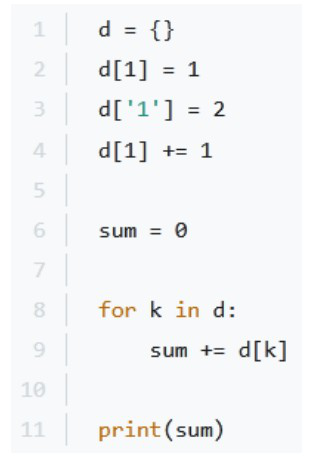
What will be the output of the following code snippet?
Show answer and explanation
Correct answer: C. 4
The code initializes an empty dictionary d, then sets d[1] = 1, d['1'] = 2, and d[1] += 1. In Python, the keys 1 (integer) and '1' (string) are distinct, so after these operations d contains {1: 2, '1': 2}. The for loop iterates over the dictionary keys and sums their corresponding values: d[1] + d['1'] = 2 + 2 = 4. Therefore, the output is 4.
Why the other options are wrong
- A. 3 would be incorrect because it doesn't account for both the integer key 1 and string key '1' being separate entries in the dictionary.
- B. 2 would only be the value of a single key, not the sum of both values in the dictionary.
- D. 1 is incorrect because the code increments d[1] from 1 to 2, and there are two keys with values to sum.
That was 10 of 481.
The full Python Institute PCEP-30-02 pack has all 481 questions, each with the answer, the explanation and why the other options are wrong, plus a questions-only copy for timed runs. US$39, paid once, with free monthly updates and a pass-or-your-money-back guarantee.