COMPTIA · SK0-005

CompTIA Server+ SK0-005 Exam Practice Questions

584 questionsInstant PDF downloadUpdated September 2026

US$39

Try 10 questions free

Card, Apple Pay or Google Pay. Your PDF is sent by email as soon as you check out.

Pass or your money backFail the exam after using this pack and we refund it. How the guarantee works
Category:
TRY BEFORE YOU BUY

Three of the 584 questions in this pack

Question 1

Which of the following is typical of software licensing in the cloud?

  1. Per socket
  2. Perpetual
  3. Subscription-based
  4. Site-based
Show answer and explanation

Correct answer: C. Subscription-based

Cloud computing environments typically utilize a subscription-based software licensing model, allowing organizations to pay recurring fees based on usage, time, or active users rather than buying perpetual licenses.

Why the other options are wrong

  • A. Per-socket licensing is traditional on-premises licensing based on physical CPU sockets.
  • B. Perpetual licensing involves a one-time upfront purchase for permanent software use, which is rare in cloud models.
  • D. Site-based licensing covers an entire physical facility or campus rather than cloud deployment models.

Question 2

A server administrator wants to run a performance monitor for optimal system utilization.

Which of the following metrics can the administrator use for monitoring?

(Choose two.)

  1. Memory
  2. Page file
  3. Services
  4. Application
  5. CPU
  6. Heartbeat
Show answer and explanation

Correct answer: A, E

A. Memory E. CPU CPU and memory utilization are primary system performance metrics monitored to measure resource load and ensure optimal system health and availability.

Why the other options are wrong

  • B. Page file usage is secondary to system memory and monitored specifically for virtual memory paging rather than general core system utilization.
  • C. Services monitoring tracks individual process states rather than hardware system utilization metrics.
  • D. Application monitoring tracks software performance rather than baseline server system metrics.
  • F. Heartbeat checks verify host uptime and availability rather than measuring system resource utilization levels.

Question 3

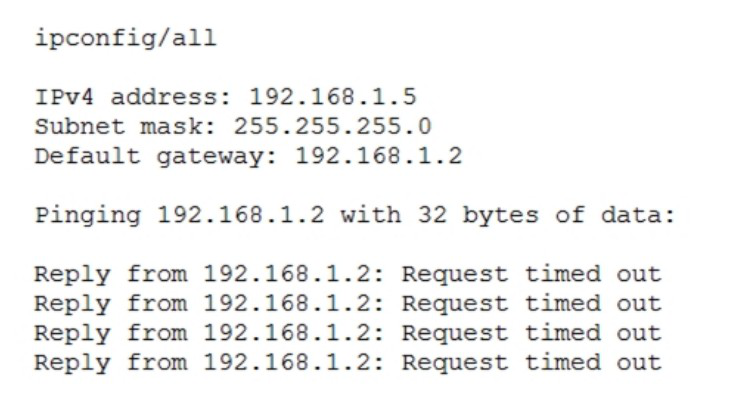
After configuring IP networking on a newly commissioned server, a server administrator installs a straight-through network cable from the patch panel to the switch. The administrator then returns to the server to test network connectivity using the ping command. The partial output of the ping and ipconfig commands are displayed below:

The administrator returns to the switch and notices an amber link light on the port where the server is connected.

Which of the following is the MOST likely reason for the lack of network connectivity?

Exhibit for question 3

  1. Network port security
  2. An improper VLAN configuration
  3. A misconfigured DHCP server
  4. A misconfigured NIC on the server
Show answer and explanation

Correct answer: A. Network port security

An amber link light on a switch port means the port has a physical link but is not forwarding traffic, which is the classic indication of a port placed in a blocked or err-disabled state. Port security does exactly that: when the port sees a MAC address it does not expect, such as a newly commissioned server plugged into a port learned for another device, it disables or restricts the port. The server's own settings are valid, 192.168.1.5 with a 255.255.255.0 mask and a gateway of 192.168.1.2 in the same subnet, so the pings would succeed if the switch were forwarding frames. Since the port is not forwarding, every ping times out. The fix is to clear the violation and update the allowed MAC addresses on that port.

Why the other options are wrong

  • B. A VLAN mismatch still forwards traffic and leaves the port green; it would place the server in the wrong broadcast domain rather than block the port.
  • C. The server already holds a valid static address, mask, and gateway in the correct subnet, so DHCP plays no part in this failure.
  • D. The ipconfig output confirms correct adapter settings, so the server's network configuration is not the cause.

See all 10 free questions Get the full pack, US$39

584 practice questions for CompTIA Server+ (SK0-005), MCQs and PBQs, with full explanations.

Every multiple choice and performance-based question comes with the correct answer, a clear explanation, and a note on why each other option is wrong. Work through it once with the answers, then again with the questions-only copy under exam conditions.

  • 584 questions, MCQs and PBQs, mapped to the SK0-005 exam objectives
  • Answers and explanations for every question, including the wrong options
  • A questions-only PDF for timed practice runs
  • Instant delivery by email the moment you check out
  • Free monthly updates for as long as the exam is live
  • Pass or your money back

A Server+ voucher costs US$399. This pack is US$39, paid once.

Try 10 questions free before you buy.

Last updated September 2026 · 584 questions

What makes the Server+ hard

Server+ is one of the few CompTIA certifications with no expiry date, no renewal fees and no continuing education. Pass SK0-005 once and the credential is yours permanently, which makes the US$399 voucher a one-time cost, and makes failing it and paying US$399 again especially frustrating.

The exam is broader than most candidates expect. It spans four domains, server hardware, server administration, security and disaster recovery, and troubleshooting, including performance-based questions that require hands-on knowledge rather than definitions. Server administration alone is 30% of the exam and troubleshooting another 28%, so candidates who prepare mainly on hardware specs tend to underestimate where the marks sit.

This pack puts all 584 questions, MCQ and PBQ, in one place, so the question format is familiar before exam day.

About the exam

CompTIA Server+ is the vendor-neutral certification for server administration professionals. It validates the ability to install, configure, manage, secure and troubleshoot server hardware and software across data centre, on-premises and hybrid environments: physical hardware, storage, virtualisation, security, disaster recovery and scripting basics. Unlike most CompTIA certifications, Server+ does not expire and requires no renewal or continuing education. The current version is V5, series code SK0-005, launched 18 May 2021. CompTIA A+ or equivalent knowledge plus two years of hands-on server experience is recommended.

Exam domains

  • Server hardware installation and management: 18%
  • Server administration: 30%
  • Security and disaster recovery: 24%
  • Troubleshooting: 28%

Up to 90 questions including PBQs, 90 minutes, pass mark 750 out of 900, Pearson VUE testing centres or online proctored, US$399 per voucher, no expiry date.
Reviews

There are no reviews yet.

Only logged in customers who have purchased this product may leave a review.

Questions before you buy

What do I get when I buy the CompTIA Server+ SK0-005 pack?

584 practice questions as a PDF, each with the correct answer, a full explanation and a note on why the other options are wrong, plus a separate questions-only PDF for timed practice.

How quickly do I receive it?

Straight away. The full PDF and a questions-only copy are emailed to you the moment your payment goes through, and the same links are on your order page.

Is there a free sample?

Yes. Ten questions from this pack, with answers and explanations, are free on this page and as a PDF, so you can judge the quality before you pay.

Are updates included?

Yes. The pack is updated every month for as long as the exam is live, and updates are free for everyone who has bought it.

What if I fail the exam?

We refund the pack. Sit the exam 7 to 30 days after buying, then send your official score report within 7 days of the exam date, as set out in the refund policy.

Can I share it with colleagues?

Each purchase is licensed to one person. For a team, school or training organisation, email support@certstash.com for a licence that fits.